Got a Spanish Invoice With a QR? What the Verifactu QR Code Says
The QR on a Spanish invoice is a link to the Tax Agency carrying four details: the issuer's NIF, the invoice number, the date and the total. What the AEAT's answer means, verifiable vs non-verifiable invoices, and the look-alike links to watch for.
The QR on a Spanish invoice is a link to the Spanish Tax Agency (the AEAT). Scan it and your phone opens a page on www2.agenciatributaria.gob.es that carries four details from the invoice: the issuer's tax ID, the series and number, the issue date and the total. The AEAT then tells you whether it holds a matching record. That's all it does. The code doesn't contain the invoice, your details, the line items or a bank account, and a "found" answer proves less than most people assume.
The scheme is called Verifactu and it comes from Royal Decree 1007/2023. It isn't compulsory yet. Real Decreto-ley 15/2025 pushed the deadlines back a year, so companies that pay corporate tax need compliant billing software before 1 January 2027, and everyone else, freelancers (autónomos) included, before 1 July 2027. Plenty of billing programs print the QR already. An invoice without one isn't suspicious in 2026, and a missing QR doesn't stop you deducting the VAT.
What the Verifactu QR code actually contains
The format is set by Order HAC/1177/2024. The code has to be between 30x30 and 40x40 mm, follow ISO/IEC 18004 and use error correction level M, which is why it scans fine even from a crumpled printout. Inside is a single URL with four parameters:
- nif: the issuer's Spanish tax ID. Nine characters, and the last one is a check character, so a mistyped or invented NIF usually fails the maths.
- numserie: the series and invoice number exactly as the issuer writes it, say A/2026/0042.
- fecha: the issue date as DD-MM-YYYY.
- importe: the invoice total with a dot for decimals, like 121.00.
A real one looks like https://www2.agenciatributaria.gob.es/wlpl/TIKE-CONT/ValidarQR?nif=89890001K&numserie=A%2F2026%2F0042&fecha=14-11-2026&importe=121.00. Some electronic invoices carry that URL as plain text instead of the picture, so a long link where you expected a square isn't a reason to panic.
I'd read those four values before letting a phone open anything. The Verifactu QR reader does that from a photo, screenshot or PDF inside the browser, checks the NIF's control character plus the date and amount formats, and only contacts the AEAT if you press its button. Then compare them with the paper. If the QR says 121.00 and the invoice says 1,210.00, you've learned something.
Verifiable (VERI*FACTU) vs "factura no verificable"
There are two kinds of Verifactu invoice, and the AEAT answers them differently.
Verifiable invoices come from software that sends a record of each invoice to the AEAT as it's issued. They must print the phrase "Factura verificable en la sede electrónica de la AEAT" or just "VERI*FACTU" in a clearly visible font, and the link ends in ValidarQR. Scan one and you get "Factura encontrada", meaning the AEAT holds an invoice with identical details, or "Factura no encontrada".
"No encontrada" isn't proof of fraud on its own. The record may not have arrived yet, or the invoice may have been cancelled. Ask the supplier before you assume the worst.
Non-verifiable invoices come from software that keeps its records and doesn't send them straight away. That's perfectly legal. The QR is still there, the link ends in ValidarQRNoVerifactu, and the answer is "Factura no verificable". Scanning one still does something, though. According to the AEAT's FAQ on the recipient sending invoice information, your scan leaves a record that the invoice exists along with its essential content, which the AEAT can use in a later check. In practice you're reporting the invoice to the tax office, which an honest supplier won't mind.
When a Verifactu QR code points somewhere else
Real codes go to one host: www2.agenciatributaria.gob.es. The only other legitimate one is prewww2.aeat.es, the AEAT's test portal for software makers, and you should only see that on a test invoice. Anything else is a red flag, including "the supplier's own checker".
The trick to watch for is the long look-alike. www2.agenciatributaria.gob.es.verificar-factura.com starts with the right words, but the site belongs to verificar-factura.com. Read a host from the right-hand end, not the left.
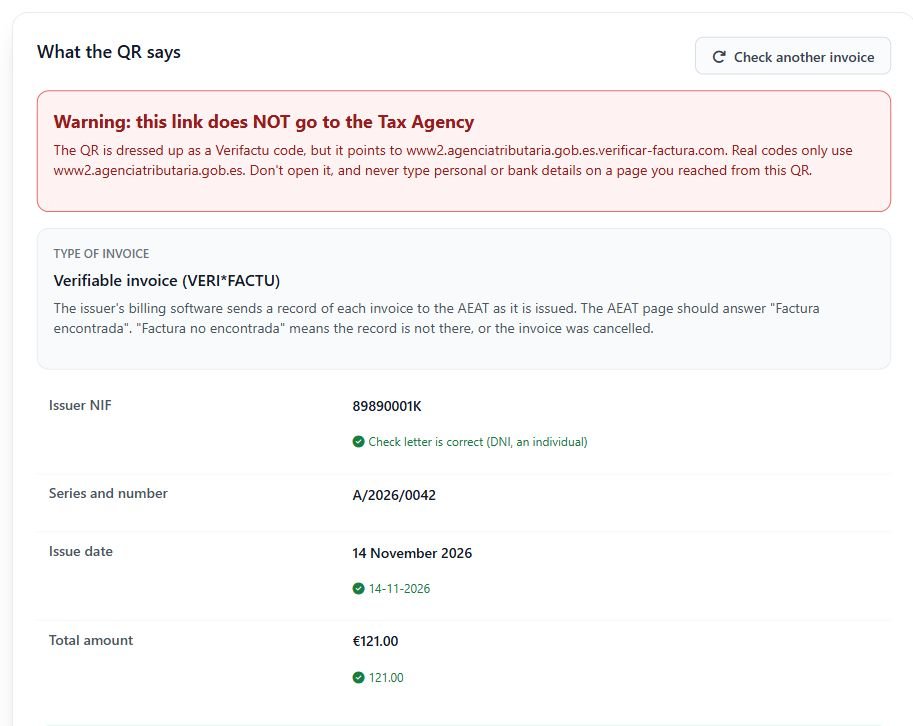
Why fake one? "Verify your invoice" is a perfect excuse for a page that asks you to log in or pay a small fee. Nothing in the Verifactu scheme needs your card or bank details to check an invoice. If a page reached from a QR asks for them, close it.
What a successful check proves, and what it doesn't
"Factura encontrada" tells you the AEAT has a record from that NIF with that number, date and total. That's useful: the invoice exists and wasn't made up from scratch.
It doesn't tell you the bank account on the invoice belongs to the supplier. The QR carries no IBAN. The classic invoice scam takes a real invoice, swaps the account number and emails it from a look-alike address, and the QR on that doctored copy will still check out perfectly. A found result also says nothing about the line items, the VAT breakdown or whether the person who sent the PDF works for the company.
So treat the QR as proof the invoice exists, nothing more. If the bank details changed since the last payment, phone the supplier on a number you already had and confirm before you pay.