Strikethrough Text Not Working? Why It Breaks and Where It Works
Crossed-out text you paste is letters plus invisible combining marks. Why it vanishes or looks wrong on Instagram, Discord and Reddit, and what works where.
There's no such thing as a strikethrough font. When you copy crossed-out text from a generator and paste it into Instagram, what you're pasting is ordinary letters with a tiny invisible instruction stuck after each one that says "draw a line through the thing before me." Whether that line shows up, where it sits, and whether it survives the trip depends on the app, the font on the reader's phone and sometimes on the character you started with.
So when strikethrough text is not working, the question is which of three things went wrong: the app stripped the marks, the font drew them badly, or the text was never Unicode strikethrough in the first place (you typed ~~ somewhere that doesn't read Markdown). Each one has a different fix.
What strikethrough text actually is
Unicode has a small group of characters it files under "Overstruck diacritics." They're combining marks, the same family as the accent in é when it's stored as e plus a separate accent. A combining mark has no width of its own. It attaches to whatever character came just before it.
The one most generators use is U+0336, which the Unicode code chart for combining diacritical marks names COMBINING LONG STROKE OVERLAY, with the note "= strikethrough" and that it connects on the left and right. That last part matters. Each letter gets its own little dash, and the dashes are meant to touch so they look like one line. Its neighbours in the same block are U+0334 (a tilde overlay, the wavy one), U+0335 (a short stroke), U+0337 (a short slash) and U+0338 (a long slash).
So the word "sale" struck through isn't four characters. It's eight: s, stroke, a, stroke, l, stroke, e, stroke. Nothing about it is formatting. It's plain text, which is exactly why you can paste it into an Instagram bio or a tweet where there's no bold button and no strikethrough button.
Markdown strikethrough is a different thing entirely
A lot of "strikethrough not working" complaints are really about Markdown. Discord, Reddit, GitHub, Slack and WhatsApp all have their own built-in strikethrough. You wrap the words in tildes, the app hides the tildes and draws a real line itself. Discord's own Markdown guide lists it as ~~Strikethrough~~, two tildes on each side.
Markdown only works where the app parses it. Type ~~old~~ into an Instagram caption and your followers see the tildes. Type it into a Reddit post title and the same thing happens, because titles are plain text even though the post body underneath accepts Markdown. Discord renders it in messages, but your display name won't, and you'll be stuck with literal tildes there.
The two approaches don't mix well either. If you paste Unicode strikethrough into Discord, it shows the overlay marks. If you then also wrap it in tildes, you get a real line on top of the Unicode dashes, which looks doubled and a bit smudged. Pick one.
Where each kind of strikethrough works
This is the bit people actually need. "Native" means the app has its own formatting, so you never need a generator there.
| Where you're typing | Native strikethrough? | How | Unicode strikethrough |
|---|---|---|---|
| Discord messages | Yes | ~~text~~ | Shows, but native looks cleaner |
| Discord display name | No | None | Only option |
| Reddit post body and comments | Yes | ~~text~~ in Markdown mode | Shows |
| Reddit post title | No | None | Only option |
| Slack | Yes | ~text~, one tilde each side | Shows |
| Yes | ~text~, one tilde each side | Shows | |
| GitHub issues and READMEs | Yes | ~~text~~ | Shows, hurts search |
| Google Docs | Yes | Alt+Shift+5 on Windows, Cmd+Shift+X on Mac | Don't, use the real format |
| Instagram bio and captions | No | None | Only option |
| X (Twitter) posts | No | None | Only option |
| LinkedIn posts | No | None | Only option |
Notice that Slack and WhatsApp use one tilde while Discord and Reddit use two. That's the single most common reason someone says Discord strikethrough is not working: they've moved over from WhatsApp and kept the one-tilde habit.
Strikethrough text not working on Instagram or in your bio?
Instagram has no formatting at all, so Unicode is the only route. When it fails there, it's almost always one of these.
You copied the visible text, not the characters. Some phones' "copy" from a screenshot or a text-recognition feature grabs only the letters it can see. The combining marks never make it to the clipboard. Copy from the generator's output box directly.
The field cleaned it. Plenty of apps normalise names and handles. A username field that only allows letters, numbers, dots and underscores will drop the marks without telling you. Bios and captions are more forgiving than name fields, so if a struck name won't stick, try the same text in the bio.
The character limit filled up. Each struck letter costs two characters in most counters. A 150-character bio holds roughly 75 struck characters, fewer if you've got spaces in a struck phrase that the counter still counts. If the last few words of your bio vanish, that's why.
Strikethrough text not showing right: broken dashes, low lines and drifting marks
The mark has no shape of its own. It's drawn by whichever font the reader's device picks, and fonts disagree about where the stroke should go.
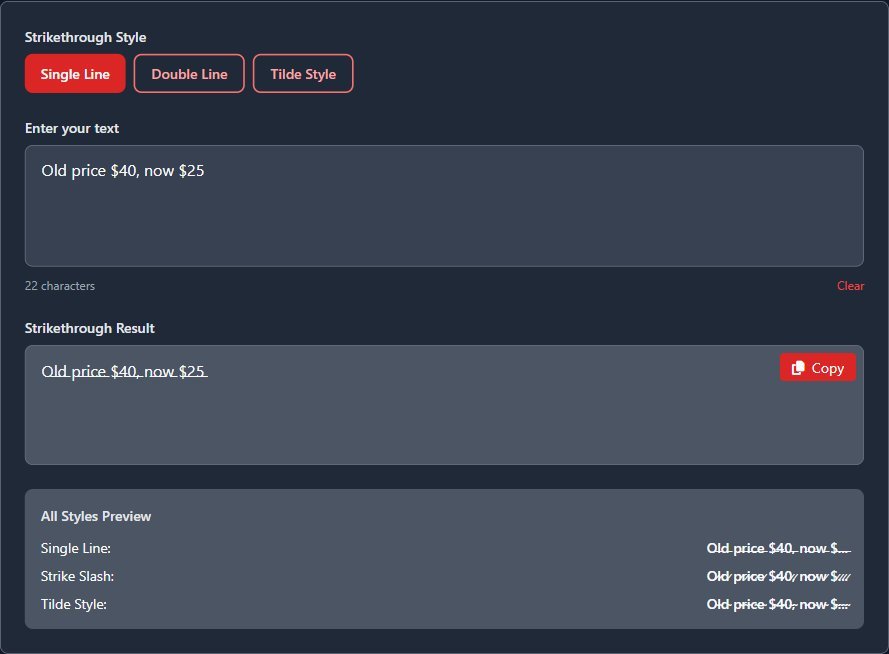
In the screenshot below, the tool's result box uses the site's normal sans-serif font, and the long stroke lands low, nearer the bottom of the lowercase letters than their middle. At a glance it could pass for an underline. In other apps and fonts it often sits right through the middle.
A few other things you'll see:
- Gaps between words. Most generators, ours included, don't put a stroke on spaces. You get one line per word with breaks between them. Some people like that; it reads more like a hand edit.
- Dashes that don't join. U+0336 is meant to connect left and right, but a font with narrow dashes leaves little gaps between letters, especially in bold or on wide letters like m and w.
- Dotted circles or boxes. If the font has no glyph for the mark, the device falls back to another font, and if none of them has it you get a dotted circle or an empty box. Older phones and older desktop systems are the usual suspects.
- Marks drifting onto the next letter. This happens when the base character is itself made of more than one piece, which brings us to emoji.
The emoji problem
Put an emoji in the middle of the text you're striking and there's a good chance it comes out as two question-mark diamonds. That isn't the platform's fault. It happens in the generator.
Most emoji sit outside Unicode's first 65,536 code points, so JavaScript stores each one as two halves called a surrogate pair. A generator that walks through your text with split('') sees those two halves as two separate "characters" and sticks a stroke after each. MDN's page on String.prototype.split() warns about exactly this: splitting on an empty string goes by UTF-16 code units and "destroys surrogate pairs."
I tested this on the strikethrough text generator here, which does its work in your browser and uses that same split. Typing "Sold out 👍 back Friday" gives a struck line with the thumbs-up replaced by two replacement characters. The character counter under the box also reads 23 for what looks like 22 characters, because it's counting the thumbs-up as its two halves.
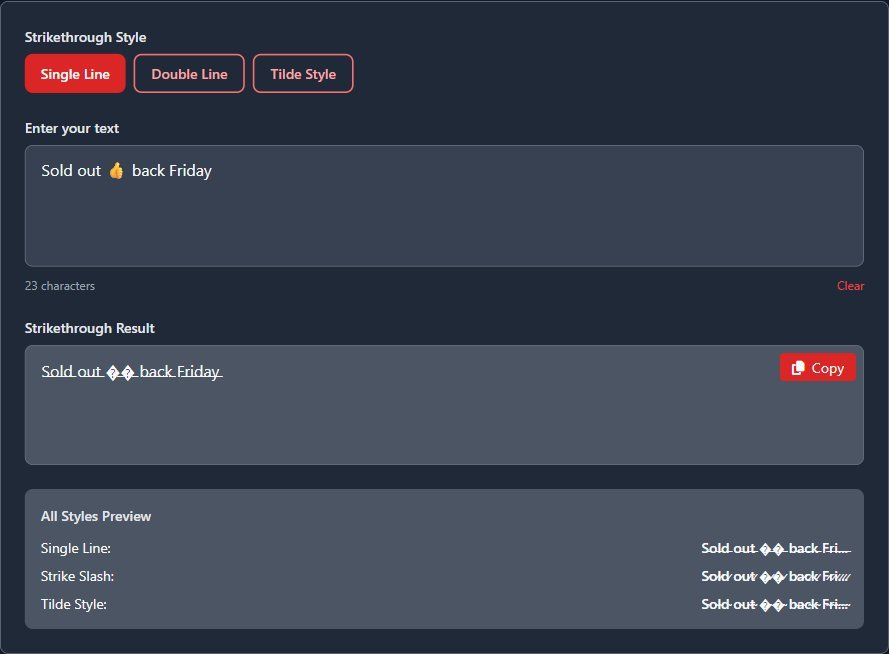
The fix is boring: strike the words only, copy the result, then add the emoji yourself where you want it. Emoji with a line through them don't look like much anyway, since the stroke is drawn at text height and gets lost against a colour picture.
Single line, slash or tilde: which overlay to use
Our generator offers three styles, and it's worth knowing what each one really inserts, because the button names don't quite match the characters.
- Single Line adds U+0336, the long stroke. This is the one people mean by strikethrough, and the one that renders most consistently.
- Double Line doesn't add two lines. It adds U+0337, the short solidus overlay, which is a small diagonal slash through each letter. The preview panel under the result calls it "Strike Slash," which is the accurate name.
- Tilde Style adds U+0334, the tilde overlay, a wavy line. Unicode's chart lists it as a phonetic symbol, and the wave is tiny at small sizes.
If you need the text to read as "crossed out" to everyone, use the single line. The slash and tilde look decorative, and on a phone at caption size they often just look like dirt on the letters.
Accessibility and search: the part people skip
Screen readers don't agree on combining marks. Some ignore them and read the word normally, which is fine. Others announce something for every mark, or spell the word out letter by letter because the marks break it into pieces they can't match to a word. Either way, a blind follower doesn't get the meaning a sighted one does. A crossed-out "$40" next to "$25" means a price cut; read aloud it might just be two prices, or a stream of noise.
Search suffers too. To a computer, "s̶a̶l̶e̶" is not "sale." Plenty of search boxes, hashtags and filters won't match it, so if you strike through the one word you want people to find, you've hidden it. Hashtags in particular stop at characters they don't expect, so don't strike through a tag.
My rule: use Unicode strikethrough for a joke, a price cut or a "changed my mind" edit where the meaning still comes across if the line is lost. If the struck words carry the meaning, say it in plain words too: "was $40, now $25."
Strikethrough text still not working? A short checklist
- Is the app one that reads Markdown? Then use its own tildes and skip the generator. Two tildes for Discord, Reddit and GitHub, one for Slack and WhatsApp.
- Copied from the output box itself, not a screenshot or a preview line? Preview lines on some generators are cut short with "...", and you'll paste the dots too.
- Any emoji or unusual symbols inside the struck part? Take them out and add them after.
- Name field or handle? Try the bio or a post instead. Those fields are often cleaned.
- Looks fine on your phone but wrong on a friend's? That's their font. There's nothing you can change in the text that fixes someone else's font.
That last point is the honest limit of Unicode strikethrough. You're sending instructions, not a picture, and every device draws them its own way. Most of the time it works. When it doesn't, a plain "was / now" sentence never fails.