
Link Extractor Missing Links? How to Extract All Links From a Website
Most link extractors read the HTML a server sends and never run the page's JavaScript, so menus, lazy-loaded lists and click handlers drop out. Five ways to extract all links from a website, compared honestly, and when a sitemap beats a crawl.
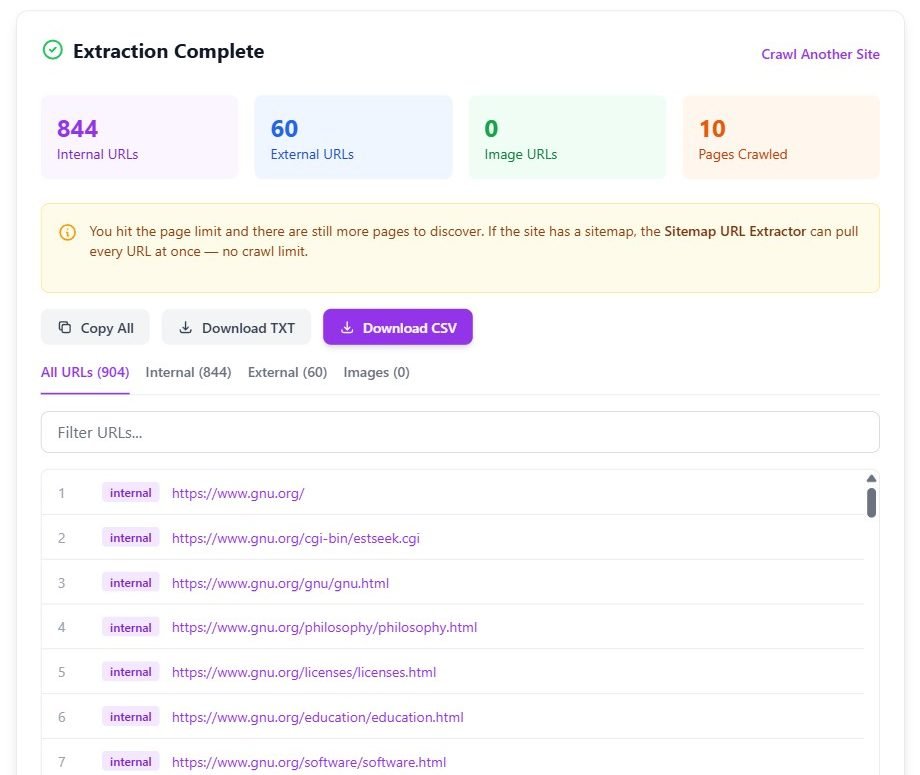
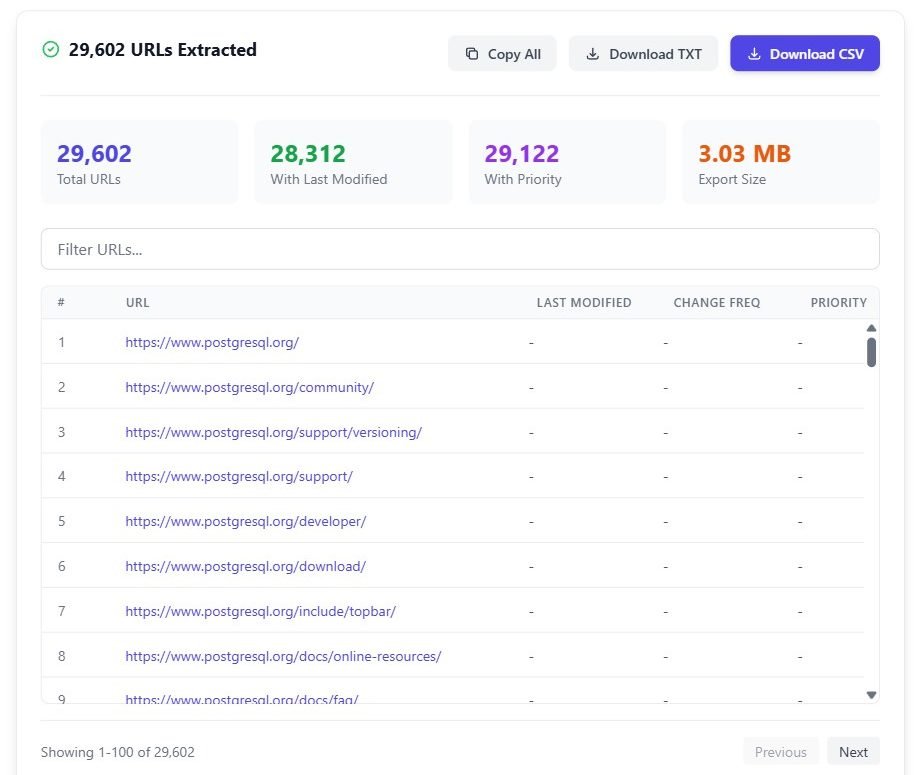
Ten pages of gnu.org, crawled one after another, gave me 844 internal URLs. A single request for the PostgreSQL project's sitemap gave 29,602. Neither number is wrong. They answer different questions, and that gap is the whole story behind a link extractor that seems to be missing half the links.
When you try to extract all links from a website, the tool you pick decides what "all" means. Some read the HTML the server sends and nothing else. Some run the page in a real browser first. Some skip the pages entirely and read the list the site owner published. If your results look thin, it's usually because the links you expected are created by JavaScript after the page loads, and your extractor never ran that JavaScript.
Five ways to extract all links from a website, compared
| Method | Runs the page's JavaScript? | How far it reaches | Cost | Best for |
|---|---|---|---|---|
| Raw-HTML crawler in the browser (our Website URL Extractor) | No | 10 to 100 pages per run | Free | Quick look at a small, server-rendered site |
| wget or curl script | No | As far as you let it | Free | Repeatable jobs on servers you control |
| Browser console on one open page | Yes, it's the live page | One page at a time | Free | Menus and lists that only exist after scripts run |
| Sitemap extractor | Doesn't need to | Every URL the owner listed | Free | Full page inventories, fast |
| Screaming Frog SEO Spider | Yes, with the paid licence only | 500 URLs free, more with a licence | £199 a year for the licence | Audits of large or script-heavy sites |
The second column is the one that matters. Everything else is about scale.
Why the links never appear: the raw HTML problem
A modern site often sends a thin HTML shell and builds the menu, the product grid and the footer with JavaScript once it reaches your browser. View the page normally and you see fifty links. Fetch the same address with a script and you might see six.
Browser-based extractors usually parse what they fetch with the DOMParser API, and MDN's reference for parseFromString is clear about what that means: scripts in the parsed document are marked non-executable and event handlers don't fire. That's a safety feature. Nobody wants a link tool running a stranger's code. But it also means anything those scripts would have added is simply not there to find.
Our website link crawler works exactly this way, so I'll be specific about what it reads. It fetches each page's HTML through our server, parses it, and collects only <a> elements that carry an href. It throws away fragment links that start with #, plus javascript:, mailto: and tel: links, and it strips the #section part from the rest. Subdomains of the address you enter count as internal, so start at example.com rather than www.example.com if you want blog.example.com in the list. These never show up:
- A menu item written as
<div/pricing')">or a<button>that changes the page. - Single-page-app links like
<a routerLink="products">with no real href. - Anything injected after load: mega menus, "related articles" widgets, search results.
- Email and phone links, on purpose. If you were hoping to pull contact addresses, that's why the list has none.
This isn't only a crawler-tool quirk. Google's guidance on crawlable links says it can generally follow a link only when it's an <a> element with an href, and lists onclick-only anchors and routerLink as formats it may fail to extract. If a link extractor can't see your navigation, there's a fair chance a search engine has trouble too. That's worth fixing on the site itself, not just in your export.
Lazy loading, infinite scroll and "load more" buttons
The second big gap is content that waits for you. Blog archives and shop categories often show twelve items, then fetch the next twelve when you scroll or press a button. The first twelve may be in the HTML. The rest live behind a request that only a running page makes.
A raw-HTML crawler gets the first batch and stops. Following the paginated version helps if the site has one: plenty of infinite-scroll pages still answer at ?page=2 or /page/2/, because their developers kept a fallback. Try that address in your browser before reaching for heavier tools.
Images have the same problem in a different form. Our crawler only reads the src attribute of <img> tags, and only when you tick the images option. Lazy-loaded images often keep the real address in data-src or srcset until a script swaps it in, so you'll get a placeholder URL or nothing.
For a single page that's script-heavy, the browser console beats every tool. Open the page, scroll to the bottom so everything loads, press F12, and run this in the Console tab:
copy([...new Set([...document.querySelectorAll('a[href]')].map(a => new URL(a.getAttribute('href'), location.href).href))].join('\n'))In Chrome and Edge, copy() puts the result on your clipboard, one absolute URL per line, duplicates removed. It reads the live page, so menus and lazy lists are included. The catch is obvious: it's one page. Doing that across 400 pages is where a rendering crawler earns its licence fee.
The sitemap route: extract all links from a website without crawling it
If what you really want is a list of a site's pages, not the links printed on each one, skip crawling altogether. Most sites publish /sitemap.xml, and robots.txt often names it on a Sitemap: line. That file is the owner's own inventory, and it doesn't care how the pages are built.
The PostgreSQL example from the top took one request in the sitemap URL extractor: 29,602 URLs, 28,312 of them with a last-modified date. No JavaScript problem, no page limit, no 500 ms pause between fetches.
Three honest limits. A sitemap lists what the owner chose to list, so orphan pages and anything they forgot are missing. It tells you nothing about external links. And our extractor reads plain XML only: when a sitemap index points at compressed .xml.gz files, which gnu.org's does, the fetch fails with an unsupported content type error. Download the .gz and unzip it on your own machine. The XML inside opens in any text editor, and every URL sits in its own loc tag.
Sitemap indexes are common on bigger sites. The tool lists each child sitemap with its own Extract button, and you can pull them one at a time or all together.
When a page limit or a blocked request is the real cause
Sometimes JavaScript isn't the problem at all. Three other causes look the same from the outside.
The page limit. Our crawler stops at 10, 25, 50 or 100 pages, 50 by default, and works breadth-first: the homepage, then everything it links to, then the next layer. On a site with deep archives, the pages it never reached hold links it never saw. When it stops with pages still waiting, it says so and points you to the sitemap route.
Failed fetches. Each page gets 15 seconds and up to five redirects. A page that times out, returns an error, or isn't HTML gets skipped without a message, and its links go with it. Sites behind bot protection often answer a server request with a challenge page or a 403, which yields almost nothing.
Links that leave the domain. External links are collected only while that option is ticked (it is by default), and the crawler never follows them. That's the right default, but it surprises people who expected partner sites in the list.
Which method I'd pick
For a page inventory, the sitemap, every time. It's faster and more complete than any crawl you'll run from a browser tab.
For the links on a few specific pages, especially a single-page app, the console one-liner. Two minutes, no install.
For a small brochure site or a WordPress blog that renders on the server, a raw-HTML crawler is fine, and a 50-page run finishes in a minute or two.
For an audit of a large, script-built site where you need every link on every page, our tools are the wrong choice. Use a desktop crawler with rendering turned on. In Screaming Frog that means the paid licence, whatever the size of the site.