"Your Connection Is Not Private": SSL Expired or Not Trusted?
The same browser warning covers an expired certificate, a broken chain and a wrong host name. How to tell which one your site has from the error code, and the fix for each.
If Chrome says "Your connection is not private" on your own site, the code under the warning tells you which problem you have. NET::ERR_CERT_DATE_INVALID means the certificate is expired (or not valid yet). NET::ERR_CERT_AUTHORITY_INVALID means it isn't trusted: self-signed, or the server isn't sending the intermediate certificate that links it to a root. NET::ERR_CERT_COMMON_NAME_INVALID means the certificate is fine but issued for a different name.
Expired is a date problem. Not trusted is a chain problem. They need different fixes, and renewing won't cure a broken chain. The annoying cases are the ones where the code seems to lie.
Expired or not trusted: read the code under "Your connection is not private"
Click "Advanced" on the warning page, or click the code itself, and Chrome shows the certificate it got. Check three things: the "valid to" date, who issued it, and the names it covers. Firefox uses different labels for the same faults (SEC_ERROR_EXPIRED_CERTIFICATE, SEC_ERROR_UNKNOWN_ISSUER, SSL_ERROR_BAD_CERT_DOMAIN), but the split is the same.
One trap with the date error. If only one visitor sees it and everyone else is fine, look at their device before your server. A laptop with a dead CMOS battery that boots up thinking it's 2019 will call every certificate on the web "not yet valid". Chrome sometimes says "Your clock is behind" outright. You can't fix that from your end.
Not trusted on Android and curl but fine in Chrome: the missing intermediate
This one wastes more hours than any other. Your site loads with a padlock in Chrome on your desktop. A customer on an Android app gets a trust error. Your webhook provider says the handshake fails. Run curl https://yoursite.com and you get "SSL certificate problem: unable to get local issuer certificate".
What's happening: your server sends only its own certificate and leaves out the intermediate. Desktop Chrome quietly papers over it by fetching the missing piece from the address written inside the certificate, or by reusing one it cached from another site. curl, most API clients and many mobile apps don't do that. They see a certificate signed by someone they've never heard of and stop.
The fix is nearly always one line of config. With Certbot, point your server at fullchain.pem, not cert.pem. With a paid certificate, the vendor's zip usually holds a "CA bundle" file; append it below your own certificate, yours first. I'd test with curl after every certificate change, because your own browser is the worst witness you have here.
Renewed but still expired, and the www that works while the bare domain fails
"But auto-renewal ran." I believe you. Certbot can write a fresh certificate to disk every 60 days and the site still serves the old one. Nginx and Apache read the file when they start and keep it in memory, and if you got the certificate with certonly using the webroot or standalone method, nothing reloads them for you. Run certbot certificates to see the new expiry date, compare it with what the browser shows, and if they differ, reload the server. Then add a deploy hook such as --deploy-hook "systemctl reload nginx" so it happens on its own next time.
This is going to bite more people soon. Let's Encrypt has said its default certificates drop from 90 to 64 days on February 10, 2027, and to 45 days on February 16, 2028, following the CA/Browser Forum rules (see Let's Encrypt's announcement on moving from 90 to 45 days). Shorter certificates mean a forgotten reload hurts within weeks, not months.
The name error has its own classic. The certificate lists www.example.com and nothing else, so example.com throws NET::ERR_CERT_COMMON_NAME_INVALID. A redirect to www doesn't help, because the browser checks the certificate before it sees the redirect. Wildcards don't save you either: *.example.com covers shop.example.com but not example.com itself, and not a.b.example.com. Reissue with both names on it. Browsers also ignore the old Common Name field once a certificate has any Subject Alternative Names, so the SAN list is the only list that counts.
What an ssl certificate checker can and cannot tell you
A checker that runs from outside your network shows what a stranger's device receives. When I want the error spelled out without opening dev tools, I paste the host into our SSL certificate expiry and chain check. It connects on port 443, reads what the server sends and reports whichever of these apply: expired (with how many days ago), not yet valid, a name mismatch, self-signed, an incomplete chain when the server sent only its own certificate, or an untrusted chain. It warns when 14 days or fewer are left, and flags TLS 1.0 or 1.1 still switched on, RSA keys under 2048 bits and SHA-1 signatures.
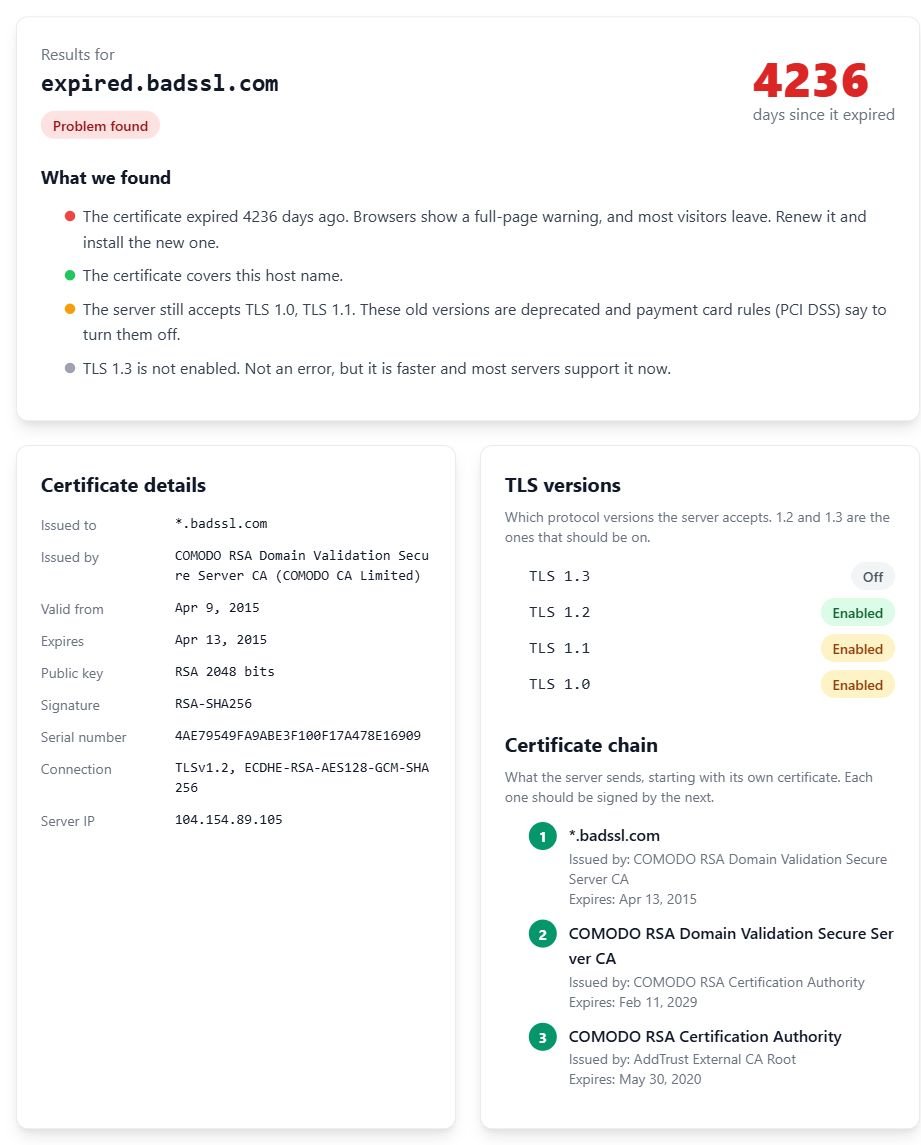
Its limits, honestly. It takes host names only, so no IP addresses, no paths and no other ports; a mail server on 465 needs a different test. It refuses names that resolve to private or reserved addresses, so it can't see your intranet. It tests one address, so if a load balancer has one stale node, you might get the healthy one. Results are cached for 10 minutes and there's a cap of 30 checks an hour from one connection, so after a fix, wait a few minutes before you call it broken.
And check the bare domain and www separately. They're two names, and they fail separately more often than you'd think.