
ERR_TOO_MANY_REDIRECTS? How to Find the Redirect Chain That Loops
Why browsers stop with ERR_TOO_MANY_REDIRECTS, how a redirect chain is walked hop by hop, what 301, 302, 307 and 308 change, the five loops behind most errors, and what a checker can't see.
A redirect loop rarely starts with one bad rule. It starts with two sensible rules that disagree. One layer says "go to HTTPS", another says "go to HTTP", and the browser bounces between them until it gives up and shows ERR_TOO_MANY_REDIRECTS.
The annoying part is that the error points at nothing. Chrome tells you it gave up. It doesn't say which server sent which hop, and by the time you're looking at the error page the chain is gone. So the first job is getting that chain back on screen, one request at a time. Once you can read it, a loop usually gives away its own cause in under a minute.
Reading the chain also catches a quieter problem that never shows an error at all: a redirect that works but takes four hops to get anywhere.
What ERR_TOO_MANY_REDIRECTS actually means
Every redirect is a response with a 3xx status code and a Location header. The browser reads the header, makes a fresh request to that address, and adds one to a counter. The Fetch Standard, which is what browsers implement, returns a network error once that counter reaches 20. Chrome shows that as ERR_TOO_MANY_REDIRECTS; Firefox calls it "The page isn't redirecting properly".
The HTTP spec itself is vaguer. RFC 9110, section 15.4 says a client should detect and intervene in cyclical redirections, and notes that an earlier version of the spec recommended a maximum of five. The exact number is left to the client.
Two things follow. A loop and a very long chain look identical to the visitor, since both end on the same error. And the error says nothing about where it went wrong. Twenty hops could be A, B, A, B ten times over, or twenty different URLs written by three plugins that never met each other.
One more trap before you start fixing. Browsers can cache 301 and 308 responses, so after you correct the rule your own browser may keep replaying the old loop. Test in a private window or from the command line before you decide the fix didn't work.
How a browser follows redirects
A redirect chain is any run of more than one redirect between the URL someone asked for and the page that finally answers with a 200. The classic version looks like this:
http://example.com/pricingreturns 301 tohttps://example.com/pricing- that returns 301 to
https://www.example.com/pricing - that returns 301 to
https://www.example.com/pricing/ - and that one finally returns 200.
Three redirects, four requests. Each rule on its own is reasonable: force HTTPS, pick a preferred host, keep a trailing slash convention. They just live in different places (CDN, web server, CMS), so nobody ever wrote the single rule that goes straight from step 1 to step 4.
Why each hop in a slow multi-hop redirect costs a round trip
The browser can't skip ahead. It has to receive the headers of hop one before it even knows where hop two lives. If hop two is on a different host, that means a new DNS lookup, a new TCP connection and a TLS handshake when it's HTTPS, then the request itself. That's several round trips. On a mobile connection with 150 ms of latency, one host-changing hop can easily cost half a second before a single byte of HTML arrives.
Hops on the same host are cheaper because the connection gets reused, but each one is still a full request and response. I ran a three-hop test chain on httpbin.org and every request took between 820 and 873 ms from my machine. The whole thing added up to 3,367 ms before the final page answered.

Crawlers pay as well. Google's documentation on HTTP status codes says its crawlers follow up to 10 redirect hops by default. Ten sounds generous until a CDN, a web server and a CMS plugin each add their own. Bing doesn't publish a number. My rule is one hop, two at most, and anything longer gets treated as a bug. Sitemaps suffer from this too: a redirect on the sitemap URL is one of the causes in our checklist for Search Console's "Couldn't fetch" error.
301, 302, 303, 307 and 308: which one goes where
The code on each hop matters for two separate reasons: what the browser does with the request method, and what search engines do with the ranking signal.
| Code | Meaning | Method on the next request | How Google treats it | Use it for |
|---|---|---|---|---|
| 301 | Moved Permanently | May turn POST into GET | Strong signal | Permanent moves, http to https, www rules |
| 302 | Found | May turn POST into GET | Weak signal | Short campaigns, login bounces |
| 303 | See Other | Becomes GET (or HEAD) | Weak signal | Sending a form post on to a result page |
| 307 | Temporary Redirect | Must stay the same | Same as 302 | Temporary moves where a POST has to survive |
| 308 | Permanent Redirect | Must stay the same | Same as 301 | Permanent moves of form or API endpoints |
The method column comes from RFC 9110. For 301 and 302 it says a user agent may change POST to GET "for historical reasons", while 307 and 308 forbid that change. It's why a form that posts to an http:// address can reach the HTTPS version as an empty GET and lose everything the visitor typed. If anything on your site posts to a URL that redirects, that redirect should be a 307 or 308.
For search, the split is simpler. Google's crawler documentation treats 301 and 308 as a strong signal that the target is the page to process, and 302, 303 and 307 as weak ones. An http to https rule or a www rule is permanent by nature, so a 302 there is simply the wrong label. Watch your framework defaults: Laravel's redirect() helper and Express's res.redirect() both send 302 unless you pass a code.
The five loops I see most often
Nearly every loop I've had to untangle came down to one of these. They share a pattern. Two layers each believe they own the decision.
HTTPS behind a proxy set to Flexible SSL
This is the most common one by a distance. In Cloudflare's Flexible mode, the visitor talks HTTPS to Cloudflare, but Cloudflare talks plain HTTP to your server. Your server sees an HTTP request, applies its "force HTTPS" rule and answers with a 301 to the https:// URL. The browser requests that, Cloudflare forwards it as HTTP again, and round it goes. Cloudflare's troubleshooting page for this error says loops will occur under Flexible if the origin redirects all HTTP requests to HTTPS, and the fix is to remove that origin redirect or set the encryption mode to Full or higher.
I'd go with Full (strict) and put a real certificate on the origin, either a free Let's Encrypt one or a Cloudflare origin certificate. The same page covers the mirror image: an origin that sends HTTPS back to HTTP while Always Use HTTPS is switched on. Any load balancer that terminates TLS can do the same thing. The app behind it has to read X-Forwarded-Proto from the trusted proxy, or it'll think every request is plain HTTP.
www and non-www fighting
The CDN or DNS host has a rule that adds www. The server config or the CMS strips it. Each one is sure it's right. In the chain you'll see the host flip on every hop: example.com, www.example.com, example.com again. Choose one host, make every layer agree with it, and delete the redirect rule from all layers except one.
Trailing slash rules that disagree
Apache's mod_dir adds a slash to directory URLs by default through its DirectorySlash setting. If an app router or SEO plugin then strips trailing slashes from every URL, and a real folder happens to exist at that path, /blog and /blog/ will bounce off each other forever. Nginx configs stitched together from two tutorials do the same. This loop is easy to recognise because the only thing changing between hops is the last character.
The CMS site URL setting disagrees with the server
WordPress keeps its address in two options, home and siteurl, and redirects requests that don't match them. If those say http://example.com while the server forces https://www.example.com, WordPress and the server hand the visitor back and forth. The WP_HOME and WP_SITEURL constants in wp-config.php override the database values, which helps when the loop itself locks you out of the admin. A site move or a staging copy with the wrong domain is the usual trigger.
A cookie that never sticks
Login pages, age gates, consent walls and language pickers often keep redirecting until a cookie says you've done the thing. If the cookie never gets stored, the redirects never stop. The usual reasons: the cookie is marked Secure but the page is on HTTP, its Domain doesn't match the host (www again), or it's set with SameSite=None but without Secure, which current browsers reject. Clearing cookies "fixes" it for one person and hides the bug from you. Look for a Set-Cookie header on every hop instead.
Reading the redirect chain hop by hop
From a terminal, curl -sIL --max-redirs 10 https://example.com prints the headers of every hop and stops a loop early. Read the status line and the Location line in each block, and the loop is usually obvious.
If you'd rather not squint at raw headers, the redirect chain checker on this site does the same walk and lays each hop out as a card with its status, time, IP and the address it points to. Give it a bare domain and it deliberately starts on http://, so you see the HTTPS hop as well.
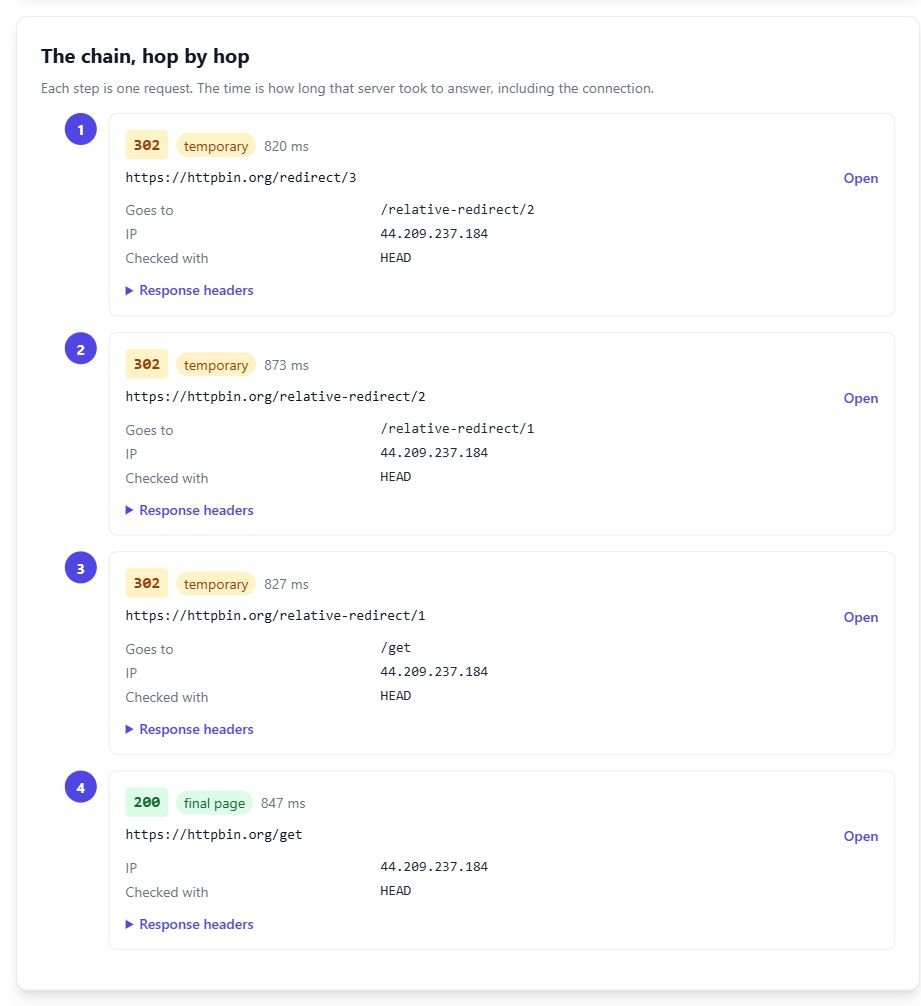
A few details about how it works, because they affect what you'll see. It asks each URL with a HEAD request and retries with GET when a server answers HEAD with 403, 405 or 501, or with an empty reply. It follows at most 10 hops, waits up to 8 seconds per hop, and stops once the whole chain passes 25 seconds. It only connects on ports 80 and 443, and it refuses private or reserved addresses, including a redirect that points into one halfway down the chain. Results are cached for 10 minutes (failed connections for 1 minute), so wait out that window when you're testing a fix. Each IP address gets 30 checks an hour.
The flags it raises line up with the loops above. It reports a loop when a URL comes back that it already visited, warns once a chain passes two redirects, fails a chain where HTTPS drops back to HTTP, and warns when www flips two or more times or when a 302, 303 or 307 handles what's only an http, www or trailing slash change. Here's a 12-hop chain:
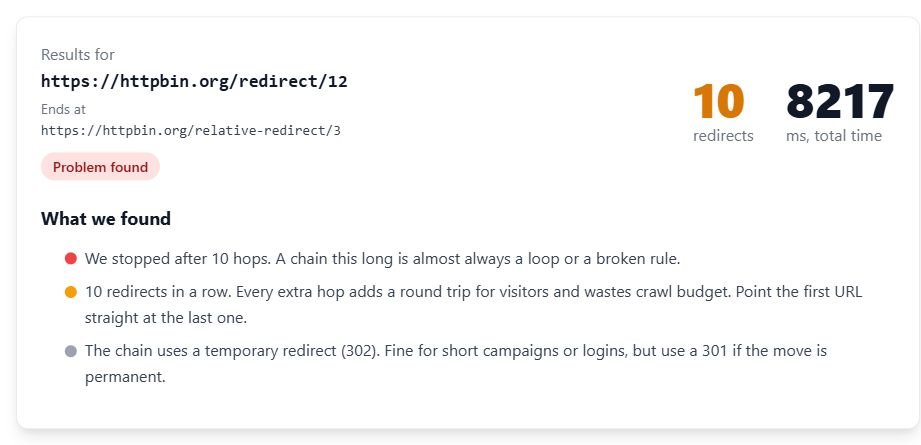
It stopped at 10 hops after 8,217 ms. Ten is the same number Google gives for its crawlers, so a chain the checker can't finish is one you shouldn't expect Googlebot to finish either.
Fixing a chain that works but is long comes down to one move: point the first rule straight at the final URL, changing scheme, host and slash in a single response. Then update your internal links so they don't hit a redirect at all.
What a redirect checker can't see
A checker running on a server sees what the server sends it. That leaves real gaps.
- JavaScript redirects. A
window.locationchange only runs in a browser. This checker reads the first 8 KB of an HTML page for a meta refresh tag and looks at the Refresh header, but it never runs scripts. Google's own redirect guide says to use JavaScript redirects only when you can't do a server-side or meta refresh one. - Redirects that depend on cookies. The checker doesn't send cookies back. It counts Set-Cookie headers on each hop and hides their values, which is enough to spot a login wall setting a cookie over and over. A loop that only happens for a logged-in user won't show up.
- Geo and user agent rules. The request comes from our server's location, with a user agent that names the checker. A rule that sends UK visitors to /uk/ or phones to an m. subdomain may never fire. Repeat the test with curl and a phone user agent, or ask someone in the other country.
- HSTS. Once a browser has seen a Strict-Transport-Security header, it rewrites http:// to https:// before sending anything. Chrome's network panel shows that as a 307 Internal Redirect that never reached the server, so the checker will show a real 301 your browser skips.
- Your own browser cache. A cached 301 keeps looping locally after the server is fixed.
If the checker shows a clean chain and your browser still loops, the answer is in that list. Check the cookie case first; it's the one I see most.