Spotify Extended Streaming History Came as JSON? How to Read It
Spotify's extended streaming history lands as a pile of JSON files with UTC times and millisecond counts. Five ways to read it, compared honestly, plus what each field means and why the totals never match Wrapped.
You asked Spotify for your whole listening history, waited, and got a zip called my_spotify_data.zip. Inside: a folder of files with names like Streaming_History_Audio_2021-2023_4.json, each one a wall of curly brackets. No chart, no top 10, nothing you can read over coffee.
The data is all there. Every stream since you opened the account, down to the millisecond. The question is what you open it with, and the answer depends on whether you want a quick look, a spreadsheet, or questions nobody has built a button for.
Five ways to read Spotify extended streaming history
Here's how the options stack up on a typical export of ten or more files.
| Method | Cost | All files at once | Skip data | Where the data goes | Effort |
|---|---|---|---|---|---|
| Text editor or browser | Free | No | Raw only | Stays on your computer | Low, but you can't sum anything |
| Excel Power Query | Needs Excel | With a folder query | Yes, as true/false columns | Stays on your computer | Medium |
| Python with pandas | Free | Yes | Yes, every field | Stays on your computer | High the first time |
| stats.fm | Needs stats.fm Plus | Yes | Shown in the app | Uploaded to their service | Low |
| Browser-based analyzer | Free | Yes, zip or loose files | Yes | Read in your browser | Low |
Before picking one, check which export you actually have. People mix these up constantly.
Account data or extended streaming history: which zip did you get?
Spotify's privacy page offers more than one download, and they look alike once unzipped. The short one, account data, holds a single year. Spotify's own page on understanding your data describes it as items listened to in the past year, with four facts per stream: when it ended (in UTC), the artist, the track and msPlayed. Its files are called StreamingHistory_music_0.json or similar.
The extended streaming history is the big one. The same Spotify page says it covers the lifetime of your account and lists far more per stream: platform, country, album, track URI, why the track started, why it ended, shuffle, skipped, offline mode and private sessions. That's the version worth waiting for.
And you do wait. The stats.fm import guide (linked further down) quotes Spotify's own request screen: it "shouldn't take longer than 30 days". Request it before you need it.
What the fields in the Spotify extended streaming history JSON mean
Every file is one JSON array. Every item in it is one stream. The fields you'll actually use:
- ts: when the stream ended, in UTC, like 2024-03-09T23:41:07Z. Not when it started, and not your local time.
- ms_played: milliseconds listened. 180000 is three minutes.
- master_metadata_track_name, master_metadata_album_artist_name, master_metadata_album_album_name: track, artist, album. All three are null on podcast rows.
- episode_name and episode_show_name: the podcast equivalents. Null on music rows.
- reason_start and reason_end: short codes. trackdone means it played out, fwdbtn means you hit next.
- skipped: true, false, or on some rows simply empty.
- shuffle, offline, incognito_mode: true or false.
- conn_country and platform: two-letter country code and the device type.
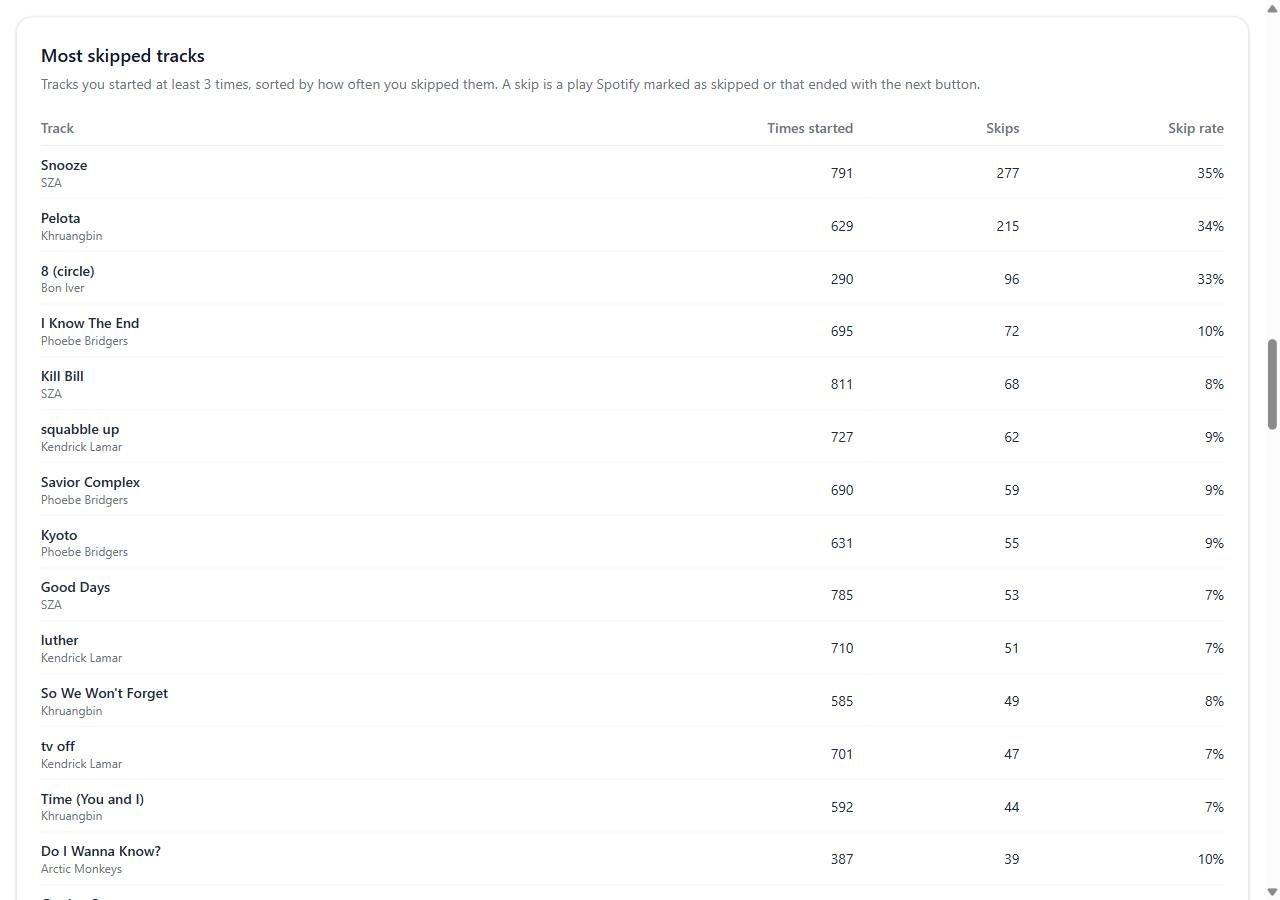
Two traps in there. Because ts is UTC and marks the end, a song you played at 11:50 pm in New York on New Year's Eve shows up in the next year's file. And because skipped isn't always filled in, a count that only looks at that one field comes out low. Checking reason_end for fwdbtn as well catches most of what's missing.
Why your numbers never match Wrapped
Almost everyone runs their files, sees a total, and messages a friend that Wrapped lied. It probably didn't. You're just counting differently.
- The 30 second rule. A stream under 30 seconds doesn't count as a play. Your file keeps every one of those short starts, including the ones where you were hunting for a song.
- Minutes versus plays. On a 13,940-row test file I ran, summing ms_played for every row gave SZA 7,180 minutes. Summing only the rows of 30 seconds or more gave 7,091. Same data, 89 minutes apart, and SZA dropped from second place to third.
- Time zones. UTC end times can push a play onto a different day than the one you remember, and around New Year onto a different year.
- Podcasts. If you add episode time to music time, your "minutes listened" balloons.
- Double counting. Load the one-year account data next to the extended history and the last year gets counted twice.
Excel and Python: free, but you do the plumbing
Excel's Power Query reads JSON directly (Data, Get Data, From File, From JSON). It expands each file into rows and columns fine. The pain is volume. You either repeat the import per file or build a folder query, then add a column that divides ms_played by 60,000 and another that turns ts into a local time. It works. It also takes an evening the first time, and the pivot table at the end only answers the questions you thought to set up.
Python is the most flexible option and the one I'd use for anything odd, like "which country did I stream from most in 2022" or "how often do I skip on shuffle versus not". This is the minimum to get top artists by minutes, counting only real plays:
import json, glob
import pandas as pd

rows = []
for f in glob.glob("**/Streaming_History_Audio_*.json", recursive=True):
    with open(f, encoding="utf-8") as fh:
        rows += json.load(fh)

df = pd.DataFrame(rows)
df["ts"] = pd.to_datetime(df["ts"], utc=True).dt.tz_convert("Europe/London")
music = df[df["master_metadata_track_name"].notna()]
plays = music[music["ms_played"] >= 30000]
top = plays.groupby("master_metadata_album_artist_name")["ms_played"].sum() / 60000
print(top.sort_values(ascending=False).head(20).round(0))
Change Europe/London to your own zone. Run it from the folder that holds the unzipped export.
stats.fm: the paid route
stats.fm is the app most people end up at. Its Spotify import guide is upfront that importing your streaming history needs stats.fm Plus. What you get for that is polish: per-track history, records, comparisons with friends, and the app keeps tracking after the import. If you want stats you'll check every week, that's a fair trade.
The catch is that the files go to their servers, and the extended history isn't just song titles. Spotify's list includes the IP address and user agent for every stream. Some people don't mind. Some do.
Reading the files in your browser instead
For a one-off look without uploading anything or writing code, I use the Spotify streaming history analyzer on this site. You drop the whole zip or the loose JSON files on it and it reads them in the browser tab. It picks out only the streaming history files from the zip, skips identical duplicate rows, and if you give it both the short and the extended export it uses the extended one so the last year isn't doubled.
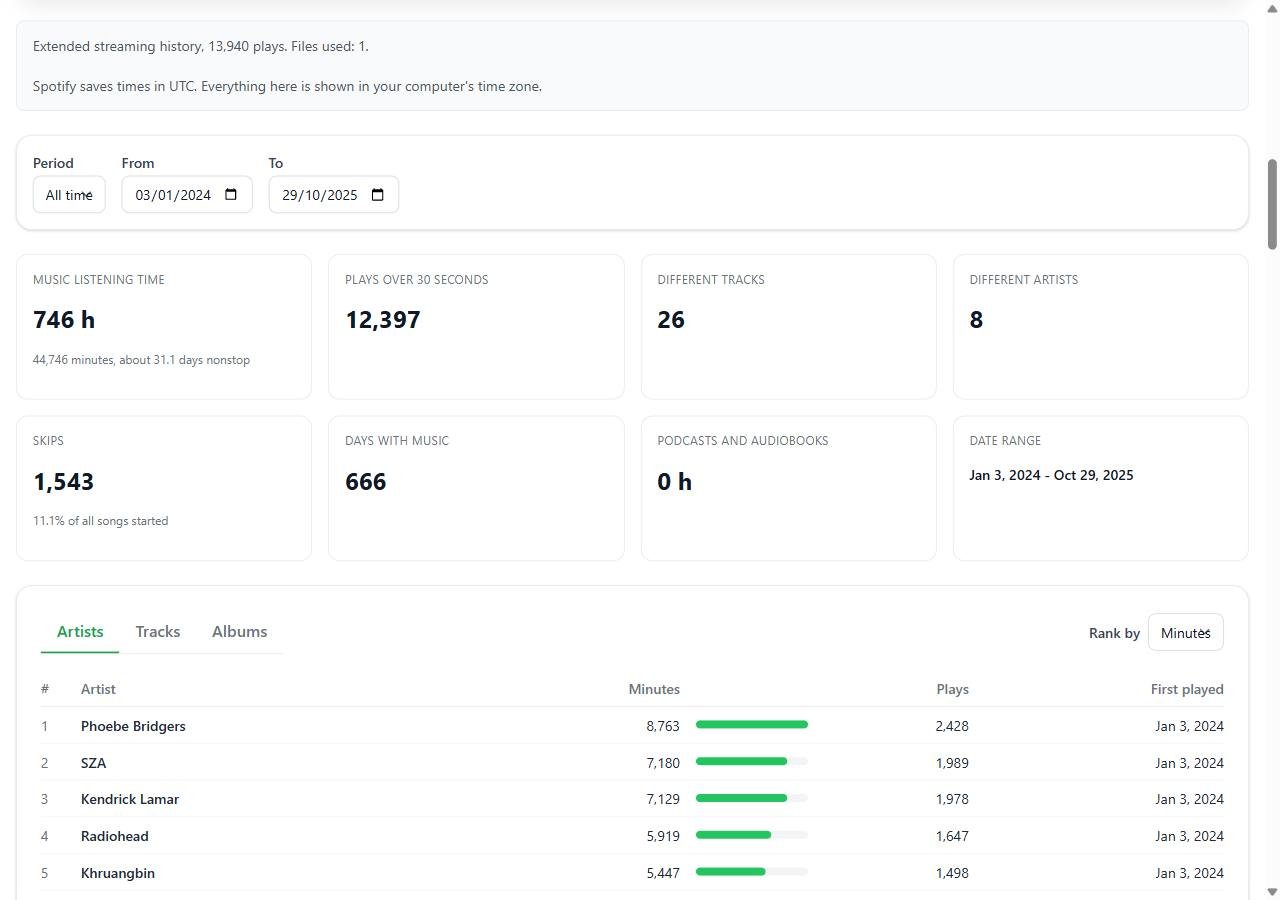
It follows the same 30 second rule for play counts, though the minutes figure includes every second you listened. Skips come from the skipped flag or a fwdbtn ending. Times are shown in your computer's time zone. On screen you get the top 100 artists, tracks and albums; the CSV export has the full list.
Where it's the wrong choice: it doesn't break anything down by country, platform, shuffle or offline mode, and it won't keep tracking after today. For those, use pandas or stats.fm. It also caps a single zip at 1 GB and a single JSON file at 500 MB, which only very old, very heavy accounts will hit.
Which one I'd pick
Curious once a year, no code: the browser analyzer. Want ongoing stats and the app experience: stats.fm, if you're fine paying and uploading. Have a specific weird question: pandas, every time. Excel sits in the middle and suits people who already live in pivot tables.
Whichever you pick, keep the original zip. The files cost you weeks of waiting, and you'll want them again next year.