ChatGPT Watermark Invisible Characters: What's Really in Your Copied Text
ChatGPT doesn't put a hidden watermark in its text. The invisible characters people find are odd spaces and zero-width characters, and here's where they come from, how to check for them and when to clean them out.
No. ChatGPT doesn't hide a secret watermark in the text it writes, at least not as of October 2026. What people find when they paste ChatGPT output into a checker are ordinary Unicode characters: odd spaces, the occasional zero-width character, curly quotes and em dashes. Some of them really are invisible. None of them is a signature that proves who wrote the text, and every one can turn up in something a person typed in Word.
Where the ChatGPT watermark rumor came from
In April 2025 a document-tools company called Rumi noticed that OpenAI's then-new o3 and o4-mini models were dropping narrow no-break spaces (code point U+202F) into longer answers. GPT-4o didn't do it. The character looks like a normal space and survives copy and paste, so "ChatGPT watermarks its text" spread fast.
Two days later OpenAI told Rumi the characters weren't a watermark, calling them "a quirk of large-scale reinforcement learning." That fits the character. U+202F has a real job in French typesetting, where it sits before some punctuation marks and between a number and its percent sign. Plenty of professionally edited text contains it, and a model trained on that text will sometimes reproduce it.
OpenAI did build a real text watermark, a statistical one that nudges word choice. In an August 2024 update to its content provenance post, the company said the method was highly accurate but easy to get around: translate the text, reword it with another model, or ask for a special character between every word and then delete them. It also worried about stigmatizing non-native English speakers who write with AI help. It never shipped. Today OpenAI's verification page checks uploads for C2PA metadata and SynthID watermarks, and it supports images and audio only. There's no text option.
The invisible characters that do turn up in ChatGPT text
Copy an answer out of ChatGPT and three kinds of characters tend to come with it. They mean very different things.
- Special spaces. The narrow no-break space (U+202F) and the ordinary non-breaking space (U+00A0) are the usual ones. They look like spaces, but code, spreadsheets and search boxes treat them as different characters. A
split(" ")won't break on them, and a find-and-replace for "12 %" typed with a normal space won't match. - Zero-width characters. Zero-width space (U+200B), zero-width joiner (U+200D), word joiner (U+2060) and the byte order mark (U+FEFF). These take up no room at all, and they're the ones that break password fields, URLs and variable names.
- Typography. Em dashes, curly quotes, the single-character ellipsis. Word's AutoCorrect inserts the same characters as you type, so they prove nothing.
There's a fourth thing, and it isn't a character. Copy from the ChatGPT web page as rich text and the HTML version on your clipboard can carry interface attributes like data-start, data-end and data-message-author-role. A plain text box drops them. A rich text editor or CMS gets the markup.
How to check text for invisible characters
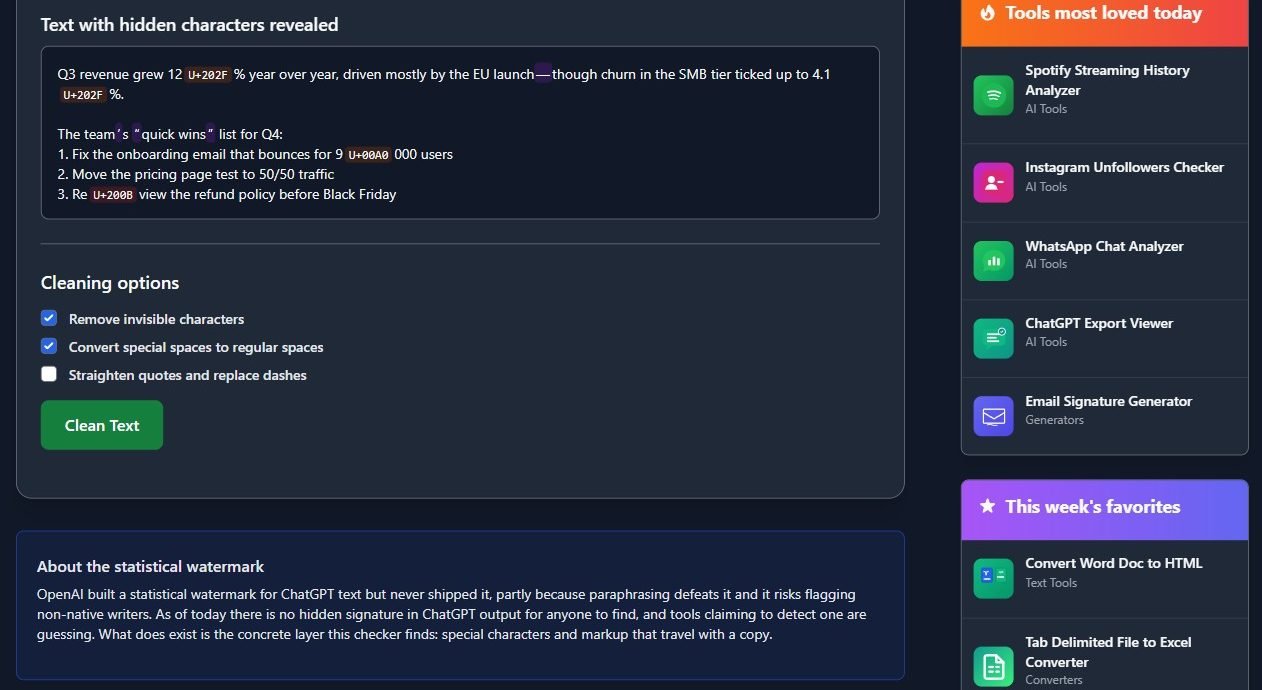
You can't see these characters, so you need something that reads code points. We built a checker for ChatGPT invisible characters that runs in your browser and doesn't send the text anywhere. It sorts what it finds into invisible characters, special spaces and typography, counts each type, and reprints your text with every hidden character shown as a labelled code point. Paste rich text and it also checks the HTML side of the clipboard for those ChatGPT attributes.
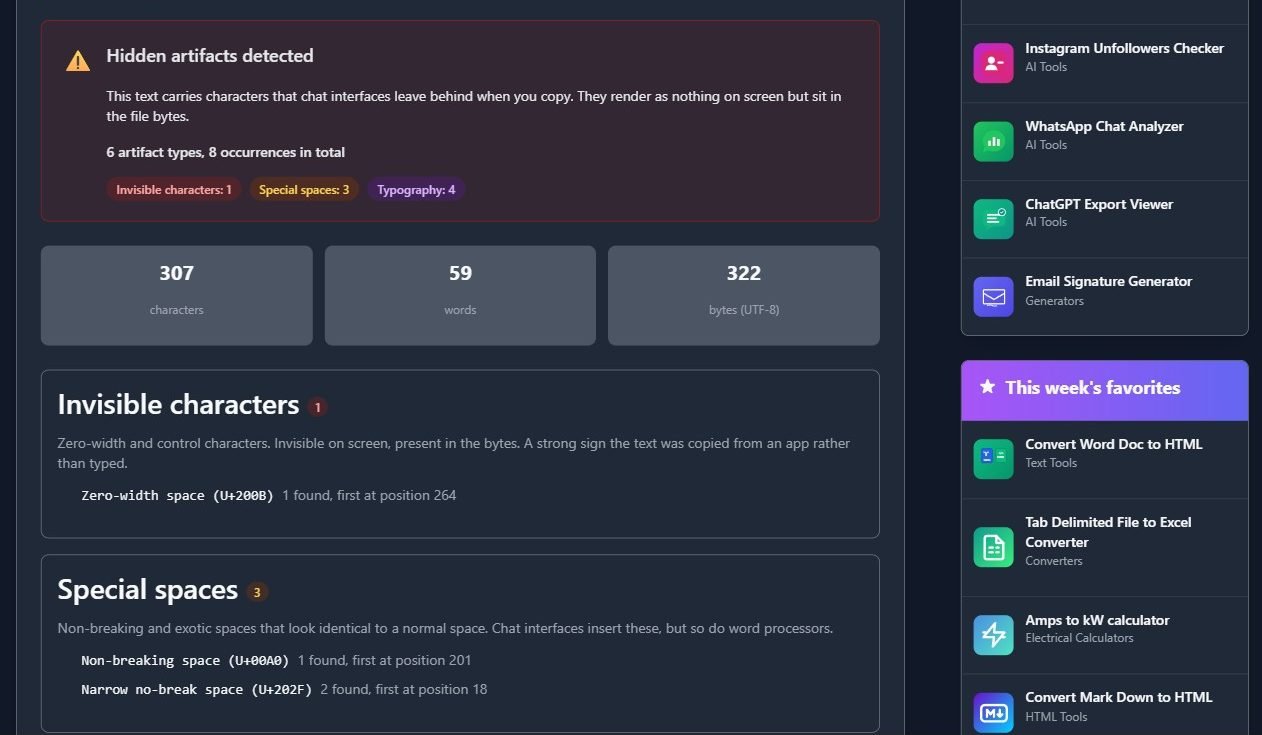
The sample in that screenshot is a short status update with four hidden characters planted in it: two narrow no-break spaces before the percent signs, a non-breaking space inside "9 000", and a zero-width space in the middle of "Review". In a normal editor it looks fine. In a spreadsheet, "12 %" with that narrow space will likely stay text instead of becoming a number.
On Linux, LC_ALL=C.UTF-8 grep -nP '[\x{200B}-\x{200D}\x{2060}\x{FEFF}\x{00A0}\x{202F}]' file.txt finds the same characters line by line. In VS Code, turn on regex in the search box and look for [\u200B-\u200D\u2060\uFEFF\u00A0\u202F].
Removing invisible characters without wrecking the text
Stripping everything that isn't plain ASCII is the lazy fix, and it breaks things. Zero-width joiners glue multi-part emoji together. The zero-width non-joiner is part of correct spelling in Persian. Directional marks keep Arabic and Hebrew in the right order.
The checker's Clean Text button is more careful. By default it removes invisible characters and turns special spaces into ordinary ones. It only drops a joiner when it sits right after a plain ASCII character, so emoji and non-Latin scripts survive, and it keeps directional marks when the text contains right-to-left script. Straightening quotes and replacing dashes is a separate checkbox, off by default, because a curly apostrophe isn't a problem in most documents.
Should you clean ChatGPT text at all?
If the text is headed into code, a spreadsheet, a database or a form field, yes. Those hidden spaces cause real bugs and cost nothing to remove.
If you're cleaning it because you think the characters will give you away, I wouldn't bother. A clean result says nothing about who wrote something, and a messy one doesn't prove AI either. Text pasted from a PDF or a French colleague's Word file lights up the same way. Style-based detectors read the words, not the spaces.
And if you're a teacher or editor looking for proof, an odd space isn't it. Talk to the writer about the work.