OGG Won't Play? What 1,078 OGG to MP3 Conversions Show
We looked at 1,078 OGG to MP3 jobs on this site. 96% came from Windows, not iPhones, and three out of four MP3s came out bigger than the OGG they replaced. Here's why, and when you can skip the conversion entirely.
Ninety-six out of every hundred people who convert OGG to MP3 on this site are on a Windows PC. Not an iPhone. Not a Mac. We expected the Apple crowd to dominate, since Apple's apps are famous for refusing OGG files, and the logs said otherwise.
That number, and a few others that surprised us, come from the conversion records for our OGG to MP3 converter between late March and mid-October 2026. It's 1,078 finished jobs. For this post I pulled only file sizes, dates and the platform part of each browser's user agent. I didn't look at file names or listen to anything, so nothing here is about what people converted, only how.
Who actually converts OGG to MP3
Here's the platform split, taken from the user agent each browser sends:
- Windows: 1,038 jobs
- Android: 35
- Mac (or iPad): 4
- iPhone: 1
So the typical person with an OGG problem is sitting at a Windows desktop. My guess is they're holding a file pulled out of a game folder, a Linux machine, a Discord download or an old voice recorder. And the reason they want MP3 is rarely Windows itself. It's whatever comes next: a car stereo that reads a USB stick, a video editor, an upload form, an MP3 player in a drawer.
The single iPhone job made me laugh a little. My read: iPhone users who get an OGG mostly play it in the app it came from and never need to convert it.
The numbers from 1,078 OGG to MP3 jobs
This is the part I didn't expect. Most people assume converting to MP3 shrinks a file. For OGG, it usually does the opposite.
| OGG file size | Jobs | Average MP3 size vs. the OGG |
|---|---|---|
| Under 1 MB | 185 | 2.82 times bigger |
| 1 to 5 MB | 647 | 1.71 times bigger |
| 5 to 15 MB | 228 | 0.70 (30% smaller) |
| Over 15 MB | 18 | 1.24 times bigger |
A few more numbers from the same records:
- 798 of the 1,078 MP3s (74%) were larger than the OGG that went in.
- 87 came out more than three times the size. Only 28 shrank to under half.
- The median OGG was about 2.7 MB, and the median MP3 was 1.8 times its source.
- Altogether, the MP3s took up about 19% more space than the OGGs they came from.
- The biggest upload sat just under the 50 MB cap.
The small files grow the most. That fits what OGG under 1 MB usually is: short game sounds, notification tones and voice clips, often encoded at a low bitrate. Turn those into MP3 at a music-grade setting and the file triples.
The 5 to 15 MB band is the odd one. Those files shrank. Probably full songs ripped at a high Vorbis quality, where the bitrate was already above what our MP3 setting aims for. That's a guess, though. We don't look inside the files.
Why the MP3 usually comes out bigger
Vorbis, the codec inside most OGG files, is simply more efficient than MP3. It reaches the same perceived quality with fewer bits. MP3 dates from the early 1990s and needs more data to hide the same artifacts.
The other half of the answer is how our converter is set up. I read the job code to be sure. It runs FFmpeg with the LAME encoder at -q:a 2, which is LAME's V2 variable bitrate mode. There's also a 192k bitrate flag in the command, but in VBR mode LAME ignores it. I checked by converting the same 60-second test file with and without the quality flag: the VBR file was 769 KB, the constant 192k one 1.4 MB.
V2 aims for audio most people can't tell apart from the source. It doesn't look at the bitrate your OGG had. A 64 kb/s Vorbis voice clip gets the same quality target as a 256 kb/s song, and VBR then spends what the audio seems to need. A thin, quiet clip stays fairly small. Noisy, busy audio gets more bits, even if the original was starved of them.
Bigger doesn't mean better
People get fooled here. A file that's three times larger feels like an upgrade. It isn't.
Both formats are lossy. When the OGG was made, the encoder threw some detail away for good. Converting OGG to MP3 decodes what's left and encodes it again with a different set of compromises. The MP3 can sound the same as the OGG. It can't sound better, and on a second or third pass you start to hear it: swishy cymbals, smeared reverb tails, a faint watery sound on quiet passages.
So the rule I'd follow: convert once, from the best file you have, and keep the original OGG. If you find a WAV or FLAC of the same track later, convert that instead.
Before you convert: can Windows just play it?
If the only problem is that a Windows app won't open the file, you might not need an MP3 at all. Microsoft added OGG support through a free Store package called Web Media Extensions back in 2017. Microsoft's announcement on the Windows blog says it adds the OGG container and the Vorbis and Theora codecs, and that once it's installed, Windows apps and Edge pick it up with no further setup.
It may already be on your PC. If it isn't, search the Microsoft Store for "Web Media Extensions" and install it, then try the file again in Media Player. VLC also plays OGG out of the box, if you'd rather not touch the Store.
One catch: some files ending in .ogg hold Opus, not Vorbis. Voice messages from Telegram and WhatsApp are the usual suspects. Opus is a different codec, and a player that handles Vorbis may still choke on it. For those, an Opus to MP3 converter or VLC is the quicker route.
Playback on your own PC is the easy case. Conversion is the right call when the file has to leave your computer: a car stereo, an old MP3 player, a video editor that won't import it, or a website that only accepts MP3 uploads.
What our OGG to MP3 converter does with your file
Since the table above comes from our own OGG to MP3 converter, here is exactly what it does, read from the code rather than the marketing copy:
- One file at a time, up to 50 MB, converted on our server with FFmpeg, not in your browser.
- MP3 at LAME V2 variable bitrate. There's no bitrate control on the page.
- The sample rate and channel count stay as they were. A mono voice clip stays mono.
- Embedded cover art is dropped. The
-vnflag in the command throws away anything FFmpeg sees as a picture stream. - The download is named after your file with the site name added, so
road-trip-mix-03.oggcomes back asroad-trip-mix-03-thefreeconverter.com.mp3. - Your upload is deleted once the job finishes, whether it worked or not.
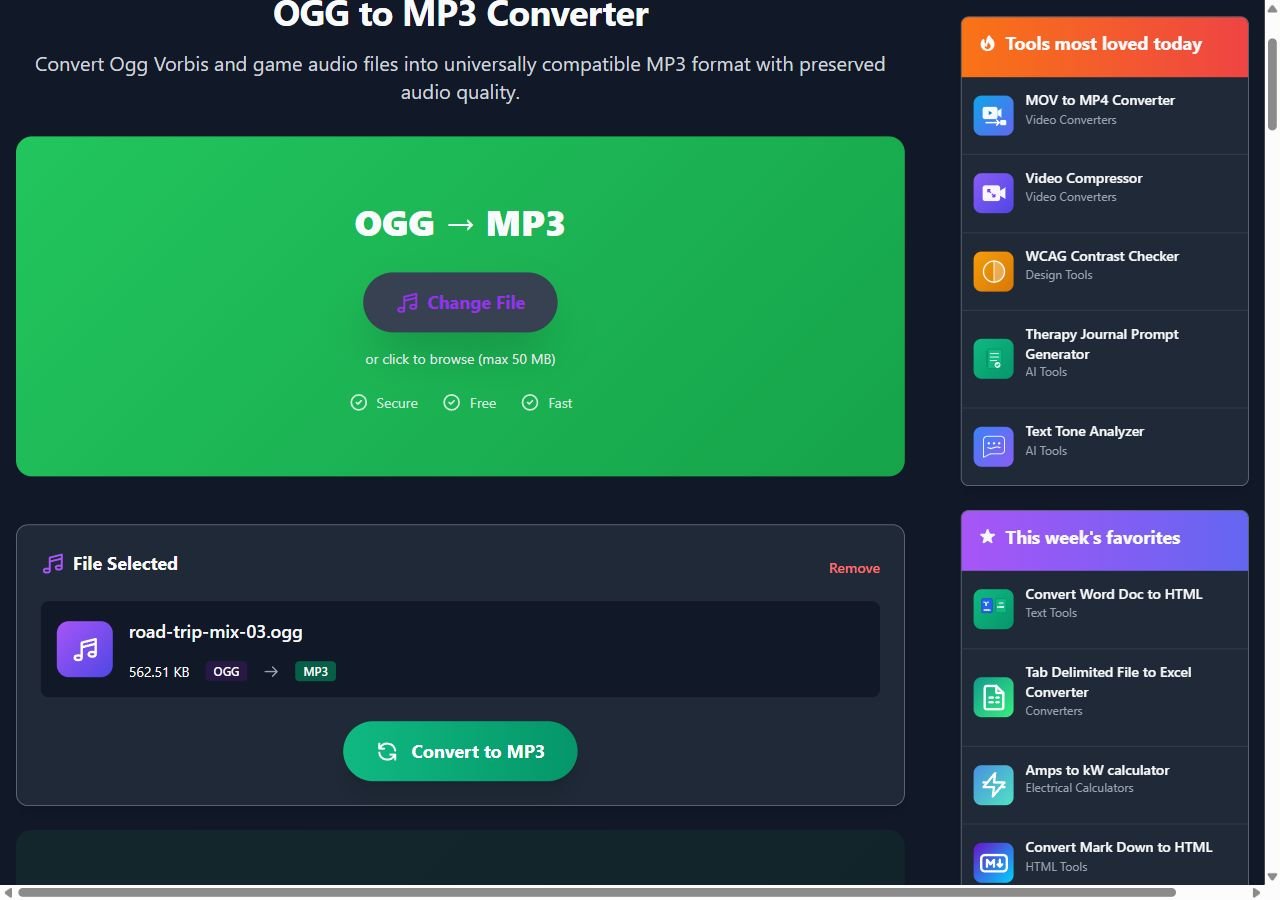
My test file was a 562 KB OGG. It came back as a 769 KB MP3, about 1.4 times the size. That is on the low side: the median in the logs was 1.8, and files this small averaged 2.8.
When you want a smaller MP3, or none at all
If you're converting a few hundred short sound effects or a folder of voice clips, V2 is overkill and the size growth adds up. Run FFmpeg yourself and pick a lower VBR level:
ffmpeg -i clip.ogg -vn -c:a libmp3lame -q:a 5 clip.mp3Higher numbers mean smaller files and lower quality, from 0 (best) to 9 (smallest). For speech, I'd go to 7 and add -ac 1 to fold stereo down to mono. Nobody needs a stereo phone call. For music you plan to keep, stay at 2 and accept the size.
And if the file is only ever going to play on your own Windows PC, install Web Media Extensions or VLC and leave the OGG alone. It's smaller, and it's one less lossy step.