
Mexican Invoice Opens as Code? CFDI XML to PDF, Explained
Why a Mexican supplier's invoice arrives as an XML file that opens as code, what the UUID, RFC, PUE and PPD fields mean, how to check it on the SAT site, and how to read a CFDI XML as a PDF.
You paid a supplier in Mexico, asked for the invoice, and got two attachments. One is a PDF. The other is an .xml file that opens in your browser as a wall of angle brackets and long strings of random letters. Sometimes there's no PDF at all, only the XML.
Here's the part most foreign buyers find backwards: the XML is the real invoice. The PDF is a courtesy copy. If you only keep one, keep the XML.
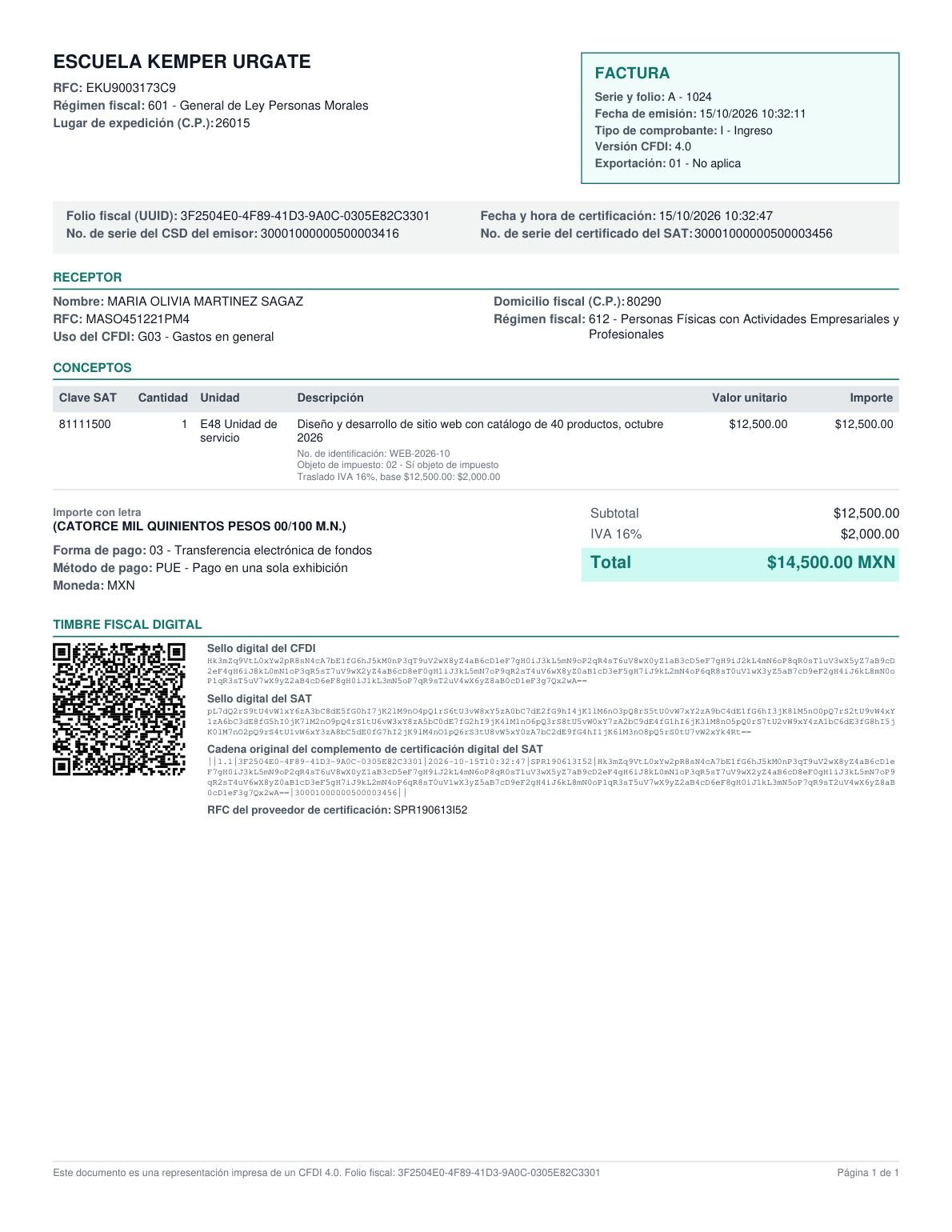
This post covers why Mexican invoices work this way, what the important fields inside the file actually mean (UUID, RFC, the type letter, PUE and PPD), how to check one against the tax authority's records, and how to get a readable PDF out of an XML when the supplier didn't send one. I'll use a real test invoice throughout, a 14,500 peso web design job, so you can see what each field looks like.
Why a CFDI XML opens as code instead of an invoice
CFDI stands for Comprobante Fiscal Digital por Internet. It's Mexico's mandatory electronic invoice, and the format is set by the SAT (Servicio de Administración Tributaria, the Mexican tax authority) in a technical standard called Anexo 20. The standard defines an XML structure. It says nothing about fonts, logos or layout, because the invoice is meant to be read by accounting software, not by people.
So when you double-click the file, Windows or macOS hands it to whatever program is registered for .xml. Usually that's a browser, which shows the raw element tree, or a text editor, which shows everything on a handful of very long lines. Nothing is broken. You're looking at the actual document, the way the SAT sees it.
The random-looking strings are digital signatures. They're why the file can't be faked convincingly, and they're also why you shouldn't open it in a text editor and "fix" a typo. Change one value and the signature no longer matches.
The XML is the invoice, the PDF is only a printout
Mexican rules call the PDF a representación impresa, a printed representation. The SAT's own filling guide for Anexo 20 says only that it has to carry a minimum set of data defined in the yearly tax rules. Suppliers design their own, which is why no two Mexican PDF invoices look alike.
That has two practical consequences. First, a PDF on its own proves very little. Anyone can type a convincing invoice into a word processor. Second, if a supplier sends a PDF and "forgets" the XML, ask for it. Your Mexican counterparts, accountants and auditors all treat the XML as the record, and the SAT's verification service can read the XML directly, while it can't do anything with a PDF.
I'd go further: if a Mexican supplier tells you they can't produce the XML, that's a red flag. Every legitimate CFDI has one, because the XML is the only thing that gets certified.
The stamp: TimbreFiscalDigital and the folio fiscal (UUID)
A CFDI doesn't become valid when the supplier saves it. The supplier signs the XML with their own certificate (the CSD) and sends it to an authorised certification provider, known as a PAC. The PAC checks it and adds a block called TimbreFiscalDigital, the digital tax stamp. That block carries:
- The UUID, also called the folio fiscal. It's a 36-character identifier like
3F2504E0-4F89-41D3-9A0C-0305E82C3301, and it's the number that identifies this invoice anywhere in the Mexican system. - The date and time of certification.
- The PAC's own RFC (
RfcProvCertif) and the serial number of the SAT certificate used. - Two seals: the supplier's seal copied over (
SelloCFD) and the SAT's seal (SelloSAT).
An XML without this block is a draft. It hasn't been certified and it isn't a valid invoice yet. If you receive one, send it back.
Suppliers often number their invoices with a Serie and Folio too, like "A 1024". That's their internal numbering. It's handy for matching against a purchase order, but the UUID is the one that matters for tax purposes, and it's the one to quote if you dispute the invoice.
Emisor, receptor and the RFC
Every CFDI names two parties. The emisor is the issuer, your supplier. The receptor is the receiver, which should be you. Each is identified by an RFC, the Mexican tax ID: 12 characters for a company, 13 for an individual. In my test file the issuer's RFC is EKU9003173C9 (12 characters, so a company) and the receiver's is MASO451221PM4 (13, a person).
If you're not a Mexican taxpayer, you don't have an RFC. The SAT's filling guide covers this case: the supplier uses the generic foreign RFC XEXX010101000, tax regime code 616 (Sin obligaciones fiscales), and S01 (Sin efectos fiscales) as the CFDI use. The XML can also carry your country in ResidenciaFiscal and your own tax number in NumRegIdTrib. If you're a foreign company and your invoice shows a Mexican RFC that isn't yours, something's wrong.
The five letters: which kind of CFDI you received
The TipoDeComprobante attribute is a single letter, and it changes what the document means. These are the ones you'll meet:
| Letter | Spanish name | What it means for you |
|---|---|---|
| I | Ingreso | A normal invoice. Your supplier earned income from you. |
| E | Egreso | A credit note: a refund, discount or return against an earlier invoice, linked to it by UUID. |
| P | Pago | A payment receipt. It carries the complemento para recepción de pagos, which records money paid against an earlier invoice. |
| N | Nómina | A payslip. You'll only see these if you employ people in Mexico. |
| T | Traslado | A goods-movement document, used to back the transport of goods. No sale and no payment fields. |
The P type confuses people more than any other. It looks like a second invoice for the same job. It isn't. It records that money arrived against an invoice issued earlier, which brings us to the payment fields.
Uso CFDI and método de pago: PUE vs PPD
UsoCFDI is the receiver's declared use of the invoice: G03 for general expenses, G01 for goods bought for resale, I04 for computer equipment, and so on. It matters to Mexican taxpayers deducting the expense. According to the SAT's question-and-answer appendix, an invoice with the wrong use has to be cancelled and replaced, so don't be surprised if a supplier reissues one for that reason alone. The new one will point back to the old UUID with relation type 04 (substitution).
MetodoPago has only two values, and this one matters to everybody:
- PUE, Pago en una sola exhibición: paid in one go, when the invoice is issued.
- PPD, Pago en parcialidades o diferido: paid later, or in instalments.
With PPD, the SAT's Anexo 20 filling guide says the payment form on the invoice is set to 99 (Por definir), and every payment received later needs an extra CFDI with the payment receipt complement. So if you pay a PPD invoice in three transfers, expect three P documents back, each listing the instalment number, the balance before, the amount paid and the balance left. If your supplier marks an invoice PPD and never sends those, your Mexican-side paperwork is incomplete.
FormaPago is the separate field for how the money moved: 03 for a bank transfer, 04 for a credit card, 01 for cash, 99 when it isn't known yet.
CFDI 3.3 vs 4.0
Open the XML and the Version attribute on the root element tells you which one you have. According to the SAT's Anexo 20 page, version 4.0 took effect on 1 January 2022 and has been the only valid version since 1 April 2023. The same page lists the main changes: the receiver's name, tax regime and postal code became mandatory, and new fields appeared for exports, global invoices and whether each line is subject to tax.
You'll still run into 3.3 files when you dig through older records, and they were valid when issued. A brand-new invoice dated this year in version 3.3, though, should be sent back. Version 3.2 and older are older still and use lowercase attribute names, which trips up a lot of parsers.
Turning a CFDI XML to PDF without installing anything
If your supplier sent only the XML, or their PDF is unreadable, you can rebuild a printout from the XML yourself. Mexican accountants do this with their billing software. For everyone else, a browser is enough. The CFDI XML to PDF converter on this site reads the file inside your browser tab, so the invoice never leaves your machine, and lays out the same fields a Mexican printout carries.
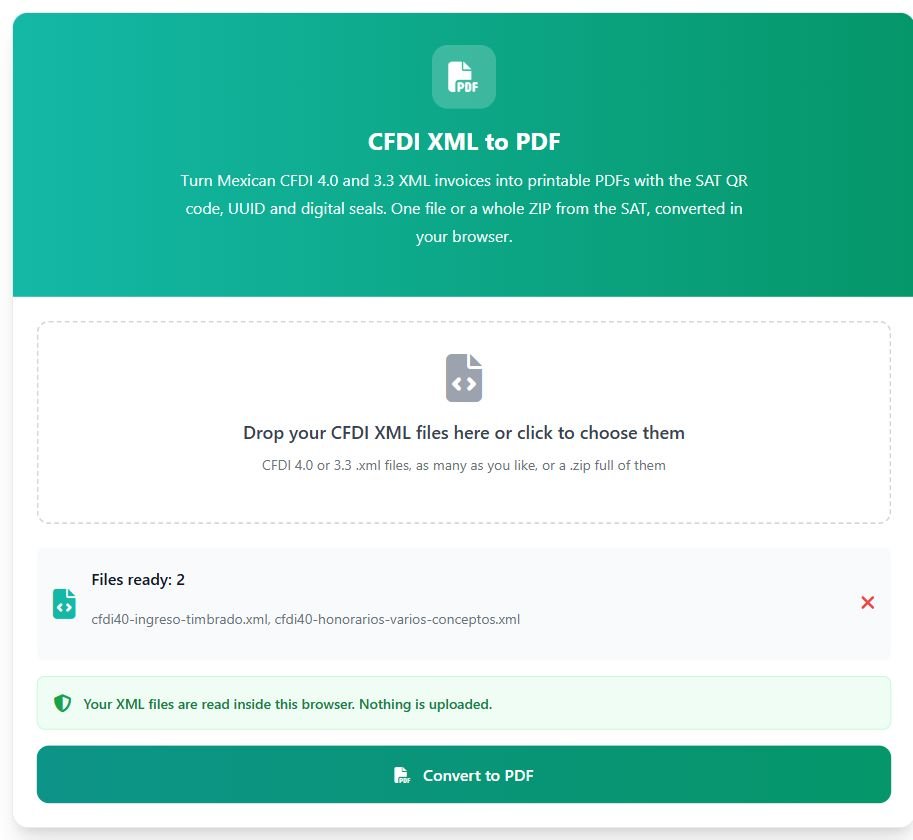
It accepts CFDI 4.0 and 3.3. It turns away version 3.2, retention certificates (CFDI de retenciones, which use a different layout), files that aren't a CFDI, and any XML containing a DOCTYPE or entity declaration, which it refuses for safety. If an XML has no TimbreFiscalDigital block, you still get a PDF, but with a red banner across the top saying it isn't a valid CFDI until a PAC certifies it. That's the right behaviour. A clean-looking printout of an unstamped draft would be misleading.
The labels on the PDF stay in Spanish, the way a Mexican printout reads, and catalogue codes get their meaning next to them ("G03 - Gastos en general", "PUE - Pago en una sola exhibición"). The total is also written out in words, as Mexican invoices usually are: "CATORCE MIL QUINIENTOS PESOS 00/100 M.N." for my test file. Payment receipts get their full payment table. Other complements, such as foreign trade or payroll details, are named on the page but their contents aren't printed, so for a payslip you'll still want the employer's own version.
One honest limit. The converter reads what's in the XML. It doesn't check the signatures. A doctored XML would print just as neatly as a real one, which is exactly why the next step exists.
Converting CFDI XML to PDF in bulk at month-end
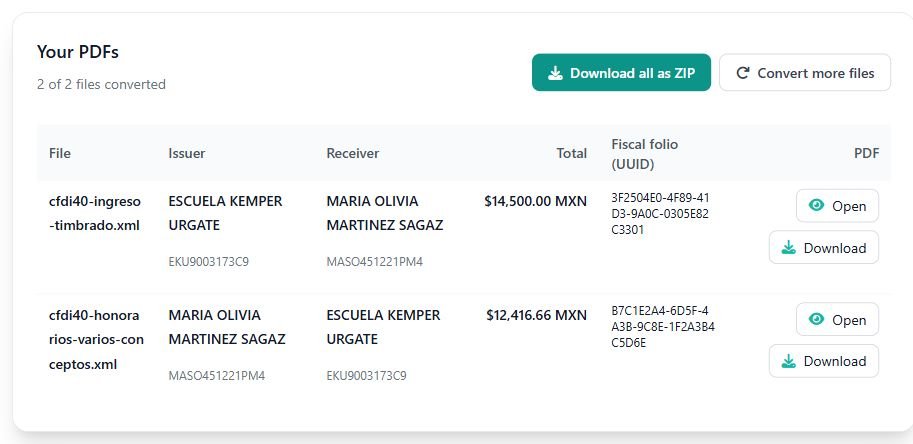
Accountants handling a Mexican subsidiary often end up with a month of invoices bundled in one ZIP. You can drop that ZIP in as it is. The tool pulls out every .xml inside, up to 1,000 files per batch, with a 5 MB cap per XML and 200 MB per ZIP. You get a table with issuer, receiver, total and UUID for each file, plus a single download of all the PDFs as a ZIP. A file that fails shows the reason under its name instead of stopping the whole batch.
What the QR code on the printout links to
Mexican invoice printouts normally carry a QR code, and it's more useful than it looks. It holds a link to the SAT's verification site with five values packed into it: the UUID, the issuer's RFC, the receiver's RFC, the total, and the last eight characters of the supplier's digital seal. The PDFs from the converter build exactly that link from the XML. Scan it with a phone and it opens the SAT's verification site with those five values in the address.
That makes the QR a quick test for fakes. If the code on a supplier's PDF points somewhere other than a sat.gob.mx address, or the details it carries don't match the ones printed beside it, stop and ask questions before you pay.
How to check a CFDI on the SAT site
You don't need a Mexican account for this. The SAT's Verificación de comprobantes fiscales digitales por internet page offers two ways to confirm an invoice was certified:
- By folio fiscal. Type the UUID, the issuer's RFC and the receiver's RFC, then the captcha digits.
- By XML file. Upload the XML itself, up to 6 MB, plus the captcha.
The PDF isn't an option on that page, which tells you everything about which file counts. For a new supplier, check the first invoice before you pay it. For an existing one, a spot check now and then costs a minute.
What to keep for your records
My own rule for anyone receiving Mexican invoices:
- Keep every XML, untouched. Don't open and resave it in an editor, since some editors change line endings or encoding, and that makes the file harder to check later.
- Keep a PDF beside it for humans: approvers, your own auditors, anyone who doesn't read XML. Supplier's version or one you made yourself, either is fine.
- Name files by UUID, or at least store the UUID in your accounting system. Invoice numbers repeat across suppliers; UUIDs don't.
- For PPD invoices, keep the P documents too and file them with the invoice they pay.
- Keep credit notes (E) with the invoice they reduce. The link between them is the UUID in the CfdiRelacionados block.
How long to keep them depends on your own country's rules, and your accountant will know. The Mexican side has its own obligations, and those belong to your supplier. Your job is simpler: hold on to the XML, because it's the only copy that can prove the invoice was real.