
Sitemap Couldn't Fetch in Search Console? Check Causes in Order
Search Console says your sitemap couldn't fetch. Here is the order I check things in: the URL itself, robots.txt, firewalls, index files, and plain slowness.
The usual reaction to a red "Couldn't fetch" in the Sitemaps report is to delete the sitemap and submit it again. Then again the next morning. That almost never changes anything, because the status describes what happened the last time Googlebot asked for the file, and resubmitting doesn't fix whatever stopped it.
Below is the order I work through when a sitemap couldn't fetch. Each step either finds the cause or rules it out in a few minutes, and the cheap checks come first.
Step 1: Open the sitemap URL and look at the status code
Copy the exact URL from Search Console, not the one you think you submitted. Typos hide in there: http instead of https, a missing www, sitemap.xml when your plugin actually writes sitemap_index.xml.
Paste it into a browser first. If you get a 404 page, you've found it. If it looks fine, check the headers from a terminal, because a browser hides a lot:
curl -I https://example.com/sitemap.xmlYou want HTTP/2 200 on the first line (or HTTP/1.1 200) and a content-type that says XML. A 301 or 302 means there's a redirect in the way. Google follows redirects, but a chain of them, or one that lands on a login page or a soft 404, is a common way to end up here. Submit the final URL, the one that answers 200 straight away.
A 500 or 503 is the other classic. Plenty of sitemap plugins build the file on every request, and on a big site that query can time out. If the URL is slow to load in your own browser, it's slow for Google too.
Step 2: Sitemap couldn't fetch? Check robots.txt for a blocking rule
Google obeys robots.txt when it fetches sitemaps, so a Disallow that covers the sitemap's path is enough to produce the error. Open /robots.txt on your domain and read every rule under User-agent: * and User-agent: Googlebot.
The pattern I see most often is a sitemap that lives in a folder someone blocked for a different reason. Disallow: /wp-content/, Disallow: /storage/, Disallow: /*.xml$ left over from an old setup. The sitemap file sits under that path and nobody noticed. While you're in there, check that the Sitemap: line points to the right URL. It's optional, but if it's wrong it sends crawlers to a dead file.
You can test both steps in one go with a sitemap finder that reads robots.txt first. Type the bare domain and it pulls the Sitemap: lines out of robots.txt, opens each one, then probes 12 common locations such as /sitemap.xml, /sitemap_index.xml and /wp-sitemap.xml. Every file it reaches gets parsed and marked valid or invalid, with its URL count and size. Here it is pointed at this site:
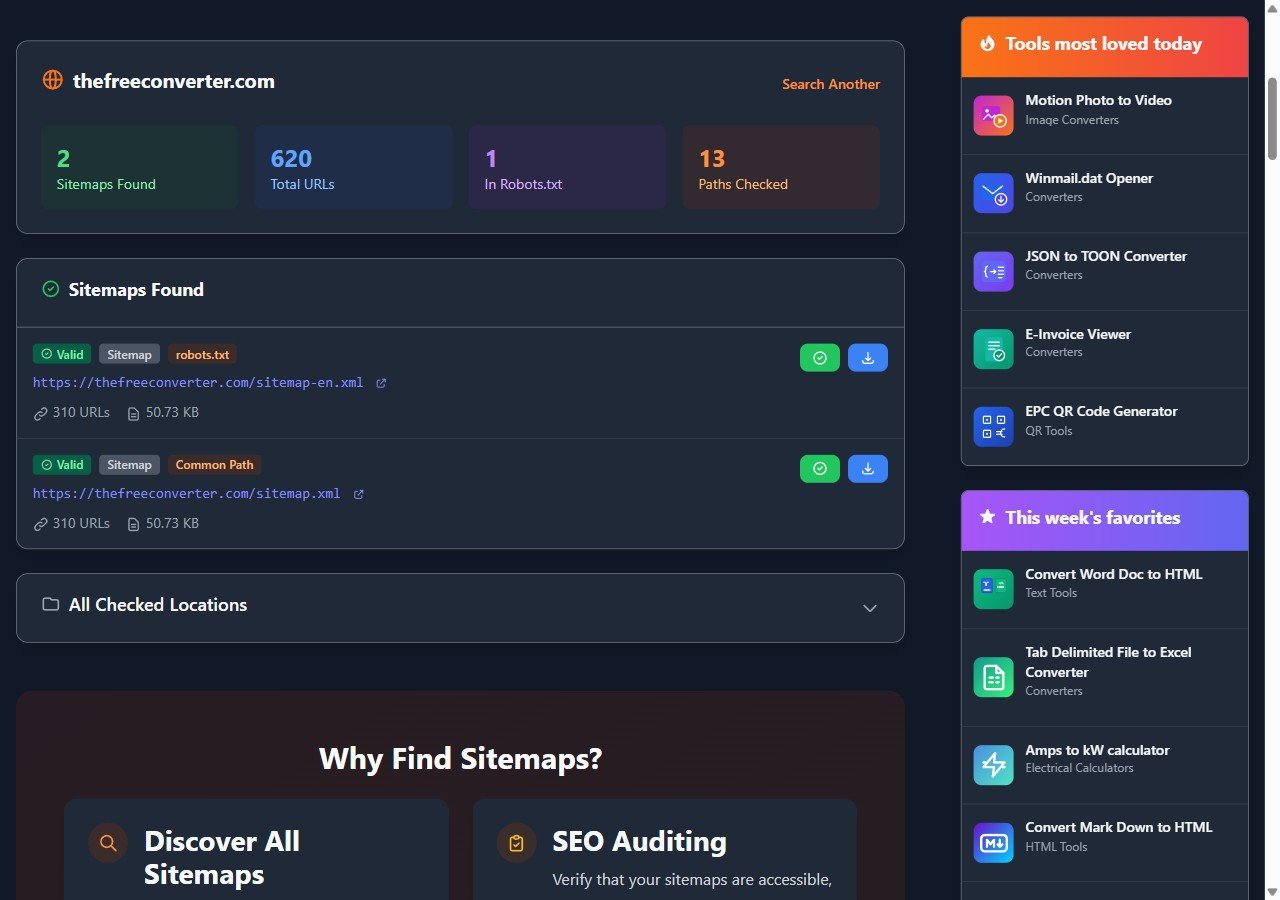
Two files came back. One is listed because robots.txt names it, the other because it sits at the default path. If your sitemap shows up with the robots.txt label and a green Valid badge, the file itself is fine, and the problem is somewhere between Google and your server.
Step 3: Rule out a firewall or CDN that turns Googlebot away
This is the cause that makes people doubt their sanity, because the sitemap opens perfectly for them. Security plugins, hosting firewalls and bot-protection services can challenge or block traffic that looks automated, and Googlebot is automated. A rate limit, a country block or a "verify you are human" page all look like a failed fetch from Google's side.
Faking the user agent with curl doesn't prove much here. Many of these services check where a request really comes from, not what it calls itself. The honest test is Google's own fetch:
- Paste the sitemap URL into the URL Inspection box at the top of Search Console.
- Click Test live URL.
- Open Page availability. You want "Crawl allowed? Yes" and "Page fetch: Successful".
If the live test fails while your browser and our checker both get a 200, look at your firewall or CDN logs for blocked requests from Google around that time. Our checker fetches from your browser and, when the site doesn't allow that, from our server with its own user agent. So a pass there tells you the file is public. It can't tell you how your firewall treats Googlebot. One more quirk: the checker only accepts XML, HTML and plain text responses, so a gzipped .xml.gz sitemap shows up as not found even when it works. Test those with curl.
Step 4: Sitemap couldn't fetch on an index? Check the child sitemaps
If you submitted an index file, the report shows a status for the index and for each sitemap inside it. An index can read fine while one child couldn't fetch, usually because a plugin lists sitemaps for post types that have no posts anymore, and those URLs return 404.
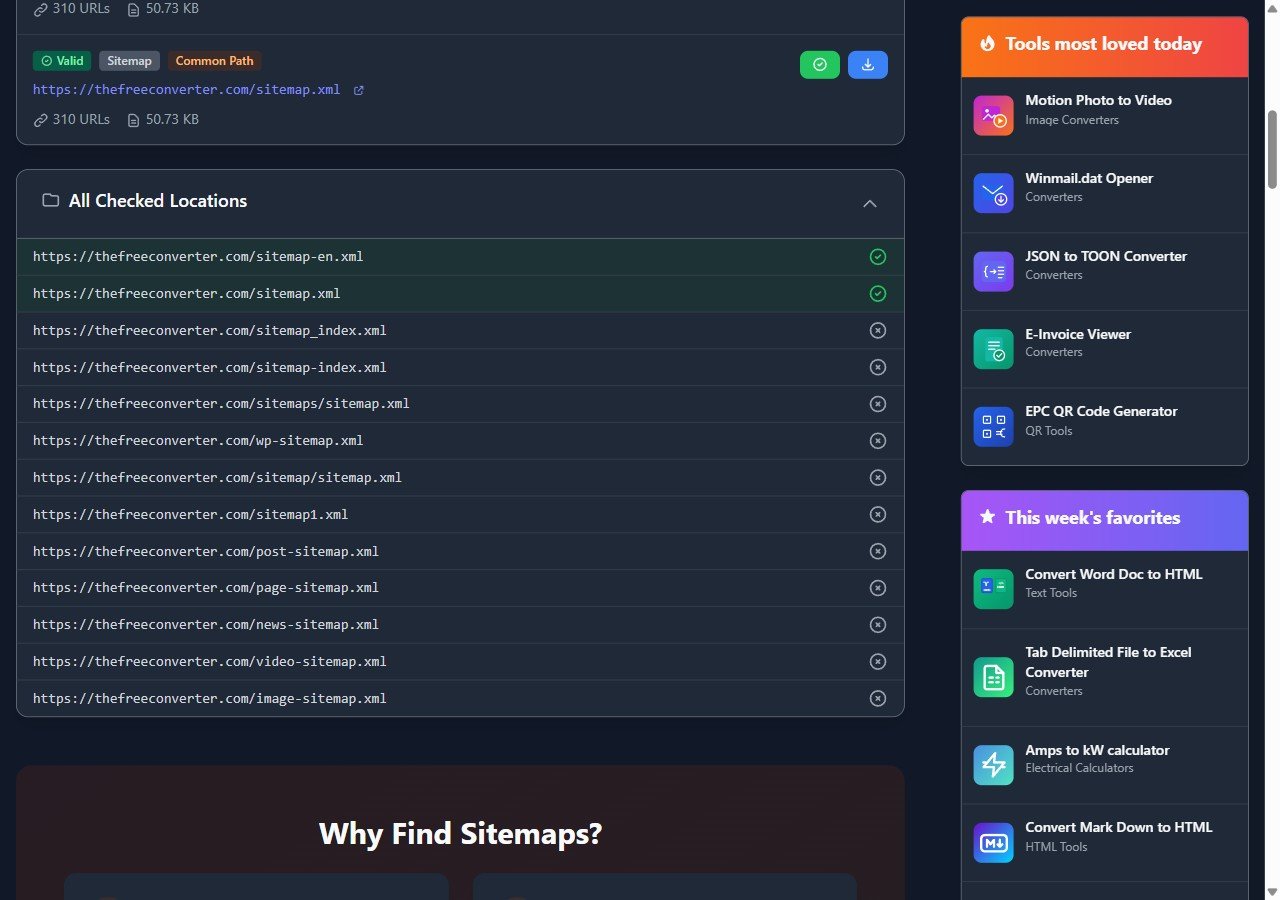
The finder's full list of checked locations shows which default paths answered, but it doesn't open the children of an index. For those, open each child URL from the index on its own, or run it through the sitemap validator, which flags bad XML, files over the 50,000 URL limit and malformed loc entries. Remove empty children from the index rather than leaving them to 404. And submit the index, not every child separately; it keeps the report readable.
Step 5: When "Couldn't fetch" is just Google not trying yet
Sometimes every check passes. The URL returns 200, robots.txt allows it, the live test says Successful, and the report still says Couldn't fetch. Two explanations are left.
The first is timing. Google's help page for the Sitemaps report says some fetch errors are transient and suggests waiting to see whether later attempts still fail. It also lists low crawl demand as a reason, which is Google's polite way of saying it isn't in a hurry to read your site. On new or small sites I've seen the status stay red for a week or more and then flip to Success without anyone touching it. If the live test passes, I'd leave it alone for that long before changing anything.
The second is a manual action. The same page says sitemaps aren't read while a site has an unresolved one. Check Security & Manual Actions in the left menu. It takes ten seconds, and if something is there, no amount of sitemap fixing will help until it's dealt with.
Last thing. A sitemap that couldn't fetch doesn't stop Google from finding your pages through links; it only removes one hint. If your pages are being indexed anyway, this is a tidy-up job, not an emergency.